
Attendance & Skills Tracking: Know Who's on the Floor — and Who's Qualified to Cover
Connects to ADP, UKG/Kronos, Attendance on Demand and other timekeeping systems, and shows supervisors which station each person is on.
Your timekeeping system keeps running payroll. 10in6 adds position assignments and skill records, so a supervisor can see an open station and who is qualified to fill it.
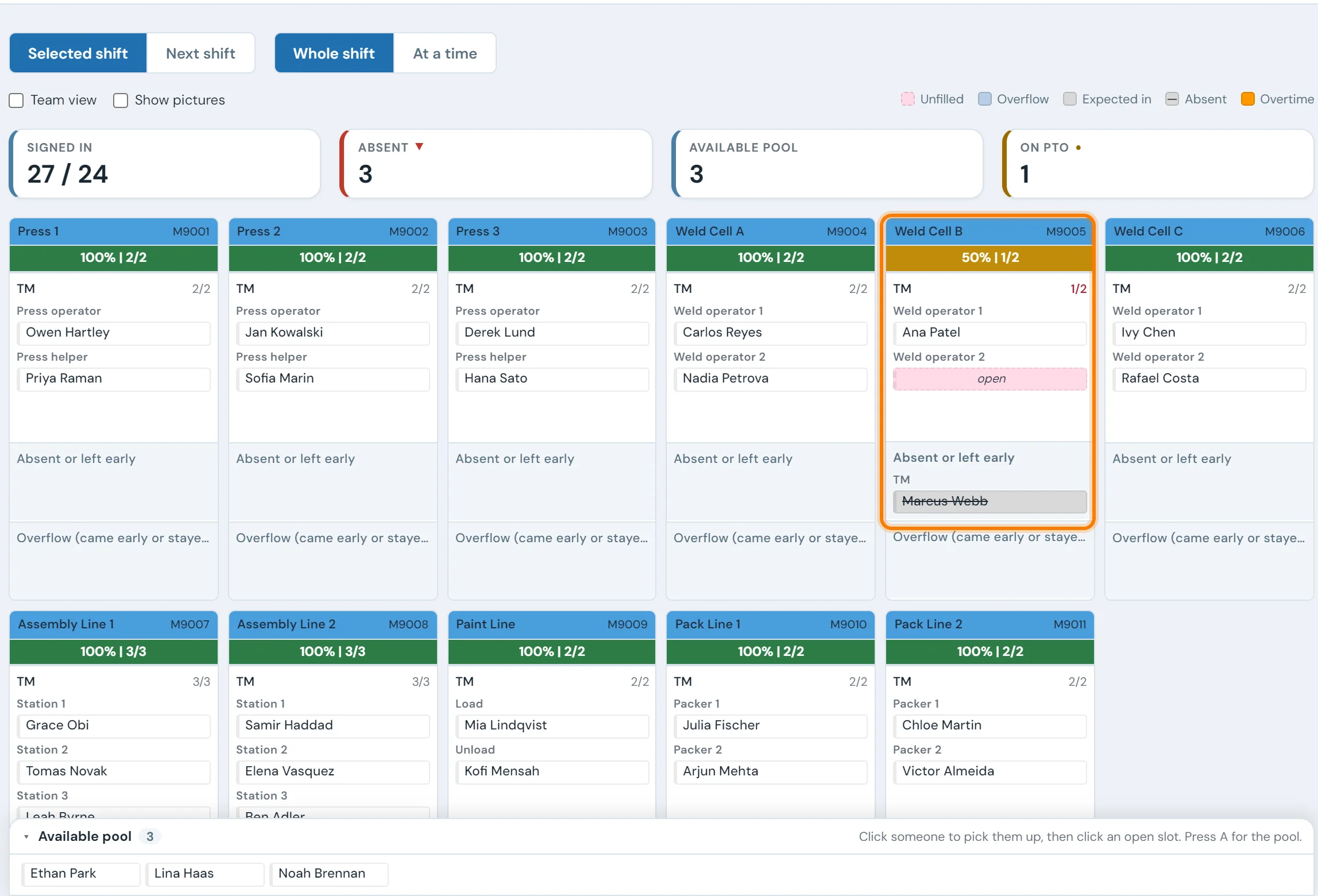
The gap between "clocked in" and "on the line"
At 6:05 the timekeeping system can tell a supervisor who clocked in. It can't tell them who is at workstation 3, who is qualified to cover the operator who just called out, or who has been signed into overtime they shouldn't be in.
Supervisors fill in the rest with a clipboard, a dry-erase board and a walk down the line. The board and the clipboard are both out of date after the first reassignment of the shift.
A live view of who's where — updated as people sign in
Each position on the board reads like "John, Cell 35 Zone 2 Unload, signed in 6:42 a.m., certified on the station." When somebody badges in, they appear at their assigned position, and everyone else is sorted into pools: available, off-shift, PTO, absent, light duty.
Floor TVs
An always-on board above the line that needs no login.
Supervisor laptop
Where supervisors drag operators between positions and build tomorrow's roster.
Supervisor phone
The same board for a supervisor out on the floor.
Plan tomorrow's shift in five minutes.
The roster builder puts tomorrow's open positions next to the operators available for that shift, each tagged with the stations they're certified on. A supervisor filling Cell 35 Zone 2 can see that S. Ahmadi is certified there before dragging the card into the slot. At 6:00 tomorrow, the badge-in signs S. Ahmadi straight into that position.
A plan can still change once the shift is running. A move scheduled for 10:00 signs the operator out of one position and into the next at that time, and both steps go into the audit trail.
Future roster builder
Available operators
Tomorrow's positions
Know who can do what — and who's almost ready.
The matrix has a row for each operator and a column for each station, and every cell reads certified, training, expiring or not qualified. The panel beside it handles the call-out: who is on shift now, certified on Cell 35 Zone 2, and where they're working at the moment.
Cells change with the work. A month of regular sign-ins at a position marks the operator as fluent, and a certification nearing its expiry date is flagged before it lapses.
Skill matrix — Line A operators
Plugs into the timekeeping system you already run
Employee records, punches and time-off sync in from timekeeping. 10in6 adds position assignments, the skills matrix and the roster, and the manpower board shows the combined picture.
Don't see yours? Most timekeeping systems work — talk to us.
The plant doesn't behave like an HR org chart.
Midnight shifts and pay-period boundaries
A 10 p.m.–6 a.m. shift starts on one date and ends on the next. 10in6 handles the crossover, including for customers whose timekeeping vendor indexes punches by pay-period day instead of wall-clock day.
Temps, contractors, and people who aren’t in HR yet
Four agency temps start on Monday and HR won't have them set up until next week. They can go on the board and into the skill matrix on day one, and their records merge once HR catches up.
Office staff, light duty, and shift-change rollover
Each role carries its own sign-in and sign-out rules. A planner in the office stays signed in through the 2:30 shift change, and an operator on light duty sits in a pool of their own when the supervisor is filling stations.
15+ years building manufacturing software
10in6 has been delivering shop-floor systems since 2008. The handling for night shifts, temps and role rules came out of those deployments, including sites where a quarter of the workforce wasn't in ADP yet and supervisors had stopped trusting the attendance data.
Operations teams using 10in6 in production today





Where cross-training risk hides
One assembly line, six positions, eleven operators across two shifts. The plant's rule: at least three qualified people per position. A headcount report says the line is fully staffed. A coverage view by position says otherwise. Illustrative numbers.
| Position | Qualified | In training | Coverage vs rule of 3 |
|---|---|---|---|
| Load / unload | 7 | 1 | Comfortable |
| Weld cell | 4 | 0 | Covered |
| Leak test | 2 | 1 | Short by one. One absence and one vacation stop the station |
| Assembly 1 | 6 | 2 | Comfortable |
| Final inspection | 1 | 0 | Single point of failure. Everything the line knows about this station is in one person |
| Pack | 8 | 0 | Comfortable |
What to do with it: the two short stations, leak test and final inspection, are the hardest to learn, which is common. The next training hours belong there ahead of load/unload and pack, which already have seven and eight qualified people. For capturing what your experts know before they leave, see when your best operator retires.
The bigger problem this solvesWho can cover when an operator calls out →What a supervisor needs before the line starts, and how to find the stations only one person can run.Common questions
What is skills tracking in manufacturing?
Skills tracking records which stations or tasks each operator is qualified to run, who is in training, and when qualifications need a refresher. It becomes useful when it sits next to live attendance, so that when someone calls out, the supervisor can see who is on shift and qualified to cover instead of checking a spreadsheet.
How many people should be trained on each station?
A common cross-training rule is at least three qualified people per position, so a station can still be covered with one person absent and another on vacation. Critical or hard-to-learn stations may need more. A skills matrix that shows coverage per position makes the gaps visible before they stop a line.
Do we have to replace our existing timekeeping system?
No. 10in6 Attendance & Skills Tracking reads employees and punches from the timekeeping system you already pay for. That system stays the record for payroll, time-off and HR, and 10in6 adds the live floor view on top.
Which timekeeping systems do you integrate with?
We currently integrate with ADP, UKG/Kronos, and Attendance on Demand directly, and have supported Workday, Paycor, and several regional providers on customer deployments. If your timekeeping vendor exposes employees and punches via API or database, we can usually integrate.
How does the live manpower board stay current?
The board updates as operators badge in, and most customers see new sign-ins within seconds. Every screen showing the board reads the same live data, so the TV above the line and the supervisor's phone show the same assignments.
How is this different from a normal attendance report?
An attendance report tells you who clocked in. 10in6 tells you which position each operator is assigned to right now, with the role and qualifications behind that assignment.
How does cross-training visibility work?
Every operator has a skill profile: the stations they're certified on, the ones they're training for, and when their last refresher was. When somebody calls out, the system shows who is signed in and qualified to cover. The matrix also updates from real work. An operator who has been running a position regularly is shown as fluent without anyone updating a spreadsheet.
Can we plan future shifts in advance?
Yes. The future roster lets a supervisor drag operators into the positions they will work tomorrow morning, next Tuesday, or for a planned changeover. When the operator badges in, they are automatically signed into their planned position. Mid-shift moves are supported with a specific scheduled time.
How are temps and contractors handled?
10in6 supports manually-added operators alongside the ones synced from your HR or timekeeping system. A temp can be assigned a position, tracked on the live board, and included in the skill matrix without needing to be added to ADP first. When they are eventually onboarded into HR, a clean reconciliation flow merges the records.
What about office staff, light duty, and shift change?
Office staff are not auto-signed-out at shift change. Light duty operators sit in a separate pool so supervisors can see who is restricted from certain stations. Shift change rollover follows separate rules for each role.
Does this require new hardware on the floor?
Usually no. The board runs on whatever supervisors and operators already use — existing shop-floor TVs, supervisor laptops, and mobile devices. Operators continue to badge in through the same time clock they use today; we read those punches and add the position-level overlay.
How long does implementation typically take?
For a focused first deployment (one timekeeping integration, one or two areas of the plant), most customers go live within four to six weeks. Multi-site rollouts and complex roster rules take longer; the connectivity and reconciliation work with HR is usually the longest part.
Set up around how your plant runs
Standardized platforms expect the plant to change to fit the software. Do-it-yourself platforms leave your team to build and maintain everything. With 10in6, we configure the system around your equipment, codes and reports, and your team runs it day to day.
Your equipment, codes and reports
Your stations, positions and shift rules, the skills your plant tracks, and a console at each station showing only what that line uses.
Your team runs it day to day
Operators, downtime and scrap codes, products and targets, shift schedules, checks, alerts, emailed reports and real-time boards are managed by your own people. Everyday changes need no support ticket and no invoice.
A project manager for the bigger things
New machines, new modules and custom reports go through a 10in6 project manager who already knows your deployment, so nothing starts from scratch. If you would rather we made everyday changes too, we can.
Still here years later
The system keeps being refined after go-live, and new capabilities are added without rebuilding it. Some of our customer relationships have run for 12 years, and 97% of customers say they would never go back.
“Our 10in6 Project Manager has been very responsive and the software is flexible enough to be configured to our specific needs.”
How the 10in6 delivery model works →
See it on your floor.
Tell us how attendance and skills are tracked today. On a free 30–60 minute call, one of our engineers will work out how the live board would look for your plant.
- No prep needed.
- Priced per asset.
- Bring your equipment list if you have one.