
OEE That Comes From Your Machines, Not Your Operators
Availability, Performance and Quality for each machine, calculated from its run signal and part counts while the shift is still running.
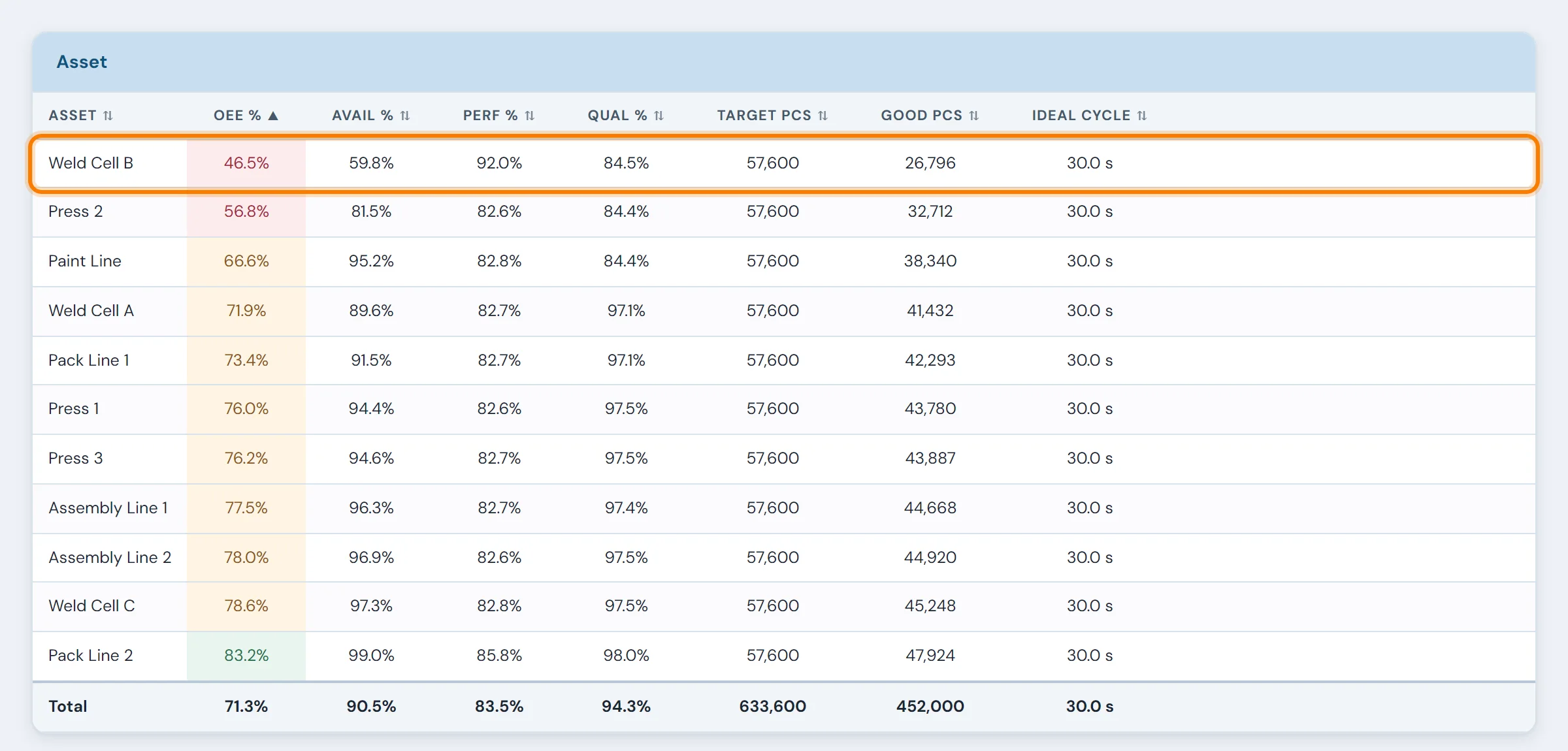
A weekly OEE figure nobody can take apart
On Monday morning someone opens the OEE workbook and types in last week's part counts from the shift sheets, the downtime minutes operators estimated at the end of each shift, and a scrap tally. The number comes out at 62%. By then the week is over, and nobody can say which machine or which loss pulled it there, or how far to trust the estimates.
For background on OEE, including where the 85% world-class benchmark and the Six Big Losses framework come from, see the glossary.
Where each of the three numbers comes from
Know when production time is being lost
10in6 records when each machine is running and when it is stopped. A stop can carry a reason code, and an operator's note where one is needed.
Availability is calculated from that run-and-stop history, so lost time is measured from the machine instead of estimated.
See when the line is running slower than it should
Performance loss is harder to spot than downtime because the machine is still running. 10in6 compares actual output with the expected rate, so slow cycles, microstops and speed loss show up as lost time instead of disappearing into the shift total.
Count only the good parts
Scrap, rejects and other quality losses recorded against the machine come off the Quality component, so OEE credits the machine only for parts that were good.
A machine at 90% Availability, 90% Performance and 99% Quality runs at about 80% OEE.
What OEE Tracking shows on the floor and in the office
On shop-floor displays and management views, and in shift and daily reports built from the same production data:
- OEE by machine, line or area, updated as the shift runs
- OEE by shift, product and time period
- The losses behind Availability, Performance and Quality
- Downtime, speed loss and scrap that keep coming back
- Alerts when performance drops mid-shift

How to calculate OEE for one shift
One machine, one eight-hour shift, one product with an ideal cycle time of 30 seconds.
Check it another way: 679 good parts × 30 s = 339.5 min of "perfect" production, and 339.5 ÷ 450 planned minutes = 75.4%. OEE is simply the share of planned time spent making good parts at the ideal rate.
Where the 24.6% went: 45 min to stops (Availability), about 55 min to running slower than ideal or to stops too short to log (Performance), and 10.5 min making parts that were scrapped (Quality). The Performance loss is the largest, and it's the one a downtime log alone would never show.
Calculating OEE when products have different cycle times
A machine that runs a 24-second bracket and a 60-second housing can't share one ideal rate. Use one rate for both and Performance stops meaning anything: fast parts look brilliant and slow parts look terrible, whatever the line did.
The fix is to compare earned time with run time. For each product, multiply the parts made by that product's ideal cycle time, add the results together, and divide by the run time. Quality works the same way with good parts only.
Set each ideal cycle from the best rate the machine has sustained on that product. Don't use the nameplate speed, or a target picked to make the numbers look good. 10in6 records which product was running at each point in the shift, so Performance can be measured against each product's own rate.
| Product | Made | Ideal cycle | Earned time |
|---|---|---|---|
| Bracket A | 400 | 24 s | 160 min |
| Housing B | 150 | 60 s | 150 min |
| Total earned time | 310 min | ||
Run time 360 min → Performance = 310 ÷ 360 = 86.1%
Use one rate for both products and the same shift reads 61% (at Bracket A's rate) or 153% (at Housing B's).
Three things that decide whether your OEE is worth tracking
An honest number
OEE is easy to inflate: stops reclassified as planned after the fact, ideal rates set conservatively, scrap counted at the end of the shift, time the line wasn't scheduled left out. Capture the data from the machine, keep planned-stop rules fixed, and report machine by machine before rolling up. Five ways plants corrupt their OEE →
The right benchmark
Judge each machine against its own honest baseline, and count it as progress when its largest losses shrink. The widely quoted 85% goes back to a set of targets from 1988. Where the 85% figure comes from →
Data from every machine, even old ones
A machine without a modern PLC usually still has a signal for running or for cycle complete. An I/O module can read it without anyone changing the controls, and where there is no signal, a sensor can often supply one. Each machine is checked individually. Which signals OEE needs →
What happened to OEE once plants could see their losses
“10in6 helps us to cut through the noise to identify the real constraints. This allows us to focus our resources on the right issues. This has led to many improvements with a positive impact to OEE.”
Modules that explain the OEE number or use it
OEE tracking questions
- What is OEE software?
- OEE software calculates Overall Equipment Effectiveness (Availability × Performance × Quality) automatically from machine data instead of spreadsheets. Good OEE software shows it live by machine, line, shift and product, and shows the losses behind the number: which stops, slow cycles and scrap took it down. The number on its own tells you how you did; the losses tell you what to fix.
- How do you calculate OEE?
- Multiply Availability, Performance and Quality. Availability is run time divided by planned production time. Performance is actual output divided by the output possible at the ideal cycle time during that run time. Quality is good parts divided by total parts. For example, a 450-minute planned shift with 45 minutes of downtime, a 30-second ideal cycle, 700 parts made and 21 scrapped gives 90% × 86.4% × 97.0% = 75.4% OEE.
- What is a good OEE score?
- The often-quoted 85% 'world class' figure is not an industry average; it is the product of three component targets proposed in 1988. What matters is your own honest baseline and whether it is improving. A plant measuring an honest 60% with a clear view of its losses is in a better position than one reporting 80% from optimistic ideal rates and reclassified downtime.
- Can you track OEE without a PLC connection?
- Often, yes. Many older machines have discrete outputs, such as a running signal or a cycle-complete signal, that can be read through I/O modules without touching the PLC or control system. Where a machine has no usable output, adding a sensor may be practical. 10in6 confirms what is possible machine by machine during the assessment, and mixed plants with connected and unconnected equipment are common.
- Which systems show live OEE by shift and product, with alerts for supervisors?
- Look for OEE software that reads counts and machine states directly, calculates OEE continuously during the shift rather than at the end of it, lets you filter by shift, product, machine and line, and raises threshold alerts when performance drops. 10in6 does all of these: live OEE by machine, line, area, shift, product and time period, on shop-floor displays and management views, with alerts configured so supervisors know before the shift is over.
- How does 10in6 calculate OEE?
- 10in6 builds OEE from the production events behind Availability, Performance, and Quality. The exact setup reflects how your operation defines productive time, losses, and good output.
- Does OEE require operator entry?
- Not necessarily. In many environments the core OEE data, run time and part counts, comes straight from machine and PLC signals. Operators add context where it is needed, such as the reason for a stop.
- Can we see OEE by shift, line, or product?
- Yes. OEE can be viewed by machine, line, area, shift, product, and time period.
- How is OEE connected to downtime tracking?
- Downtime Tracking explains Availability loss. It records when each machine stopped, for how long and why, so the team can go from the OEE number to the individual stops behind it.
- What if some machines are not connected yet?
- The exact approach depends on the equipment and available signals. 10in6 can work with mixed environments, and connectivity options are confirmed during the assessment phase.
- Can the system alert us when OEE drops?
- Yes. Threshold-based visibility and alerts can be configured so teams know when performance needs attention before the shift is over.
Set up around how your plant runs
Standardized platforms expect the plant to change to fit the software. Do-it-yourself platforms leave your team to build and maintain everything. With 10in6, we configure the system around your equipment, codes and reports, and your team runs it day to day.
Your equipment, codes and reports
OEE calculated from your own machine signals, using your expected rates and your rules for planned stops.
Your team runs it day to day
Operators, downtime and scrap codes, products and targets, shift schedules, checks, alerts, emailed reports and real-time boards are managed by your own people. Everyday changes need no support ticket and no invoice.
A project manager for the bigger things
New machines, new modules and custom reports go through a 10in6 project manager who already knows your deployment, so nothing starts from scratch. If you would rather we made everyday changes too, we can.
Still here years later
The system keeps being refined after go-live, and new capabilities are added without rebuilding it. Some of our customer relationships have run for 12 years, and 97% of customers say they would never go back.
“Our 10in6 Project Manager has been very responsive and the software is flexible enough to be configured to our specific needs.”
How the 10in6 delivery model works →
See what your OEE is, and what's pulling it down.
Tell us about your machines and how OEE is calculated today. We'll show you what it looks like built from machine data, per product, with the losses ranked by lost time.
Free 30–60 minute call with one of our engineers.