Get Help to the Line Faster
Operators call maintenance, quality, team leads, material handlers or another support group with a single action, and every call is tracked from trigger to resolution.
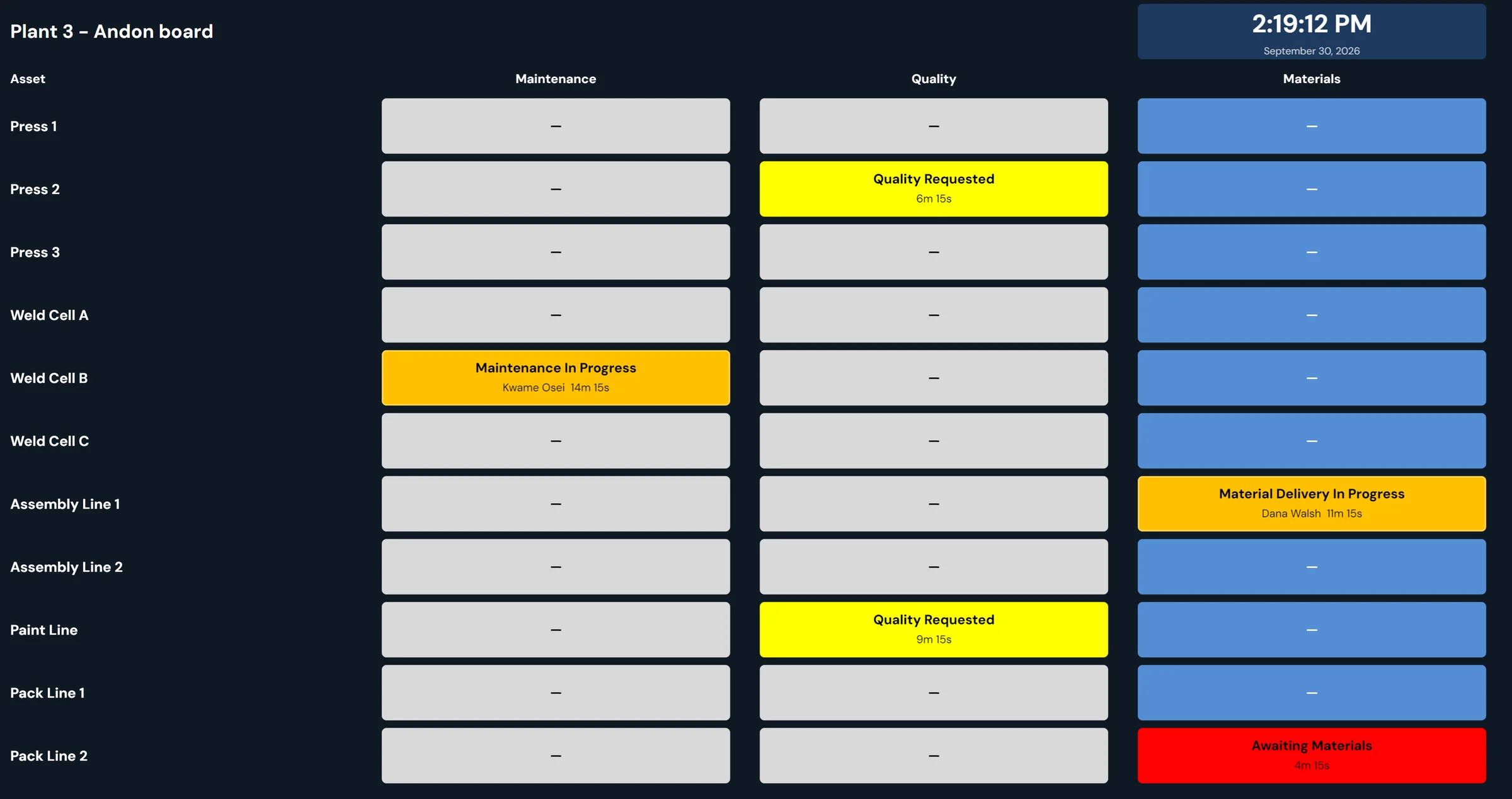
Walk-overs, radio calls and texts lose time and leave no record
Weld Cell B has stopped for a tip change. The operator leaves the station to find a team lead, the team lead radios maintenance, and someone texts the technician on call as well. The cell gets running again, but nobody wrote down when it stopped, how long the technician took to arrive, or what the actual fix was.
Each call for help goes a slightly different way, so the delay is hard to measure and the follow-up depends on who remembers it. After a month, nobody can say which kinds of calls come up most, which areas wait longest, or where the same problem keeps interrupting the line.
From the button press to the resolved record.
The operator triggers a call for assistance
From the 10in6 Operator Console, the operator raises an Andon call with one button press, without leaving the station. The call carries the type of support needed: maintenance, quality, team leader, material delivery or another configured group.
The group that handles it is notified immediately
Each call is routed by its call type and workflow to the Andon boards and Real-Time displays, with email or SMS alerts where those are set up.
The call stays visible until it is resolved
The call stays open in a tracked workflow, so supervisors and support teams can see that the issue is active, who is responding and whether it has been resolved.
Response and resolution timing are recorded
10in6 records when the call was triggered, when someone responded and when the issue was resolved, so the plant can see where response time is improving or falling behind.
Call history shows where help is needed most
Over weeks, the call records support reporting on call types, departments, response times and recurring issues. That shows the disruptions that keep coming back and the departments that call for help most often.
What it looks like

| Alert Description: | Material Handler Call |
| Location: | Injection Department · Injection #2 |
| Summary | |||||
|---|---|---|---|---|---|
| Work Order | Classification | Category | Sub-Category | Status | Who Initiated |
| 266450 | General | Material Handler | Waiting for response | Super | |
| Issue Owner 1 | Issue Owner 2 | Issue Owner 3 | Due Date | Priority | |
| 30-Nov-21 | 0 | ||||
| Issue Description | |
|---|---|
| Black Resin Needed at Injection 2 |
| Resolution History | ||||
|---|---|---|---|---|
| Entry | Entered By | Time Entered | Corrective Action | Resolution |
- 1
The operator calls
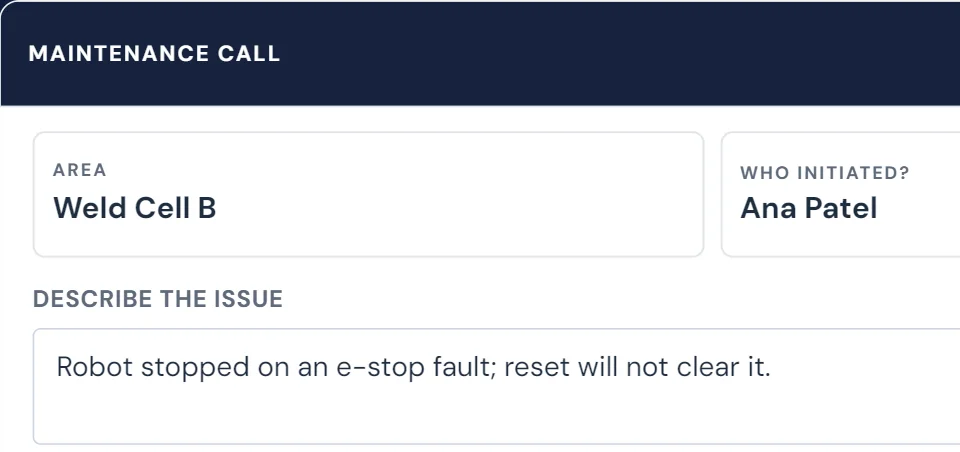
Ana Patel presses Maintenance on the Weld Cell B console and describes the fault.
- 2
The button shows the call is open
The Maintenance button turns red and reads Awaiting Maintenance until someone takes the call.
- 3
The technician takes it
Kwame Osei signs in at the same console and presses the button, which turns amber: Maintenance In Progress.
- 4
The fix is recorded and the call closed
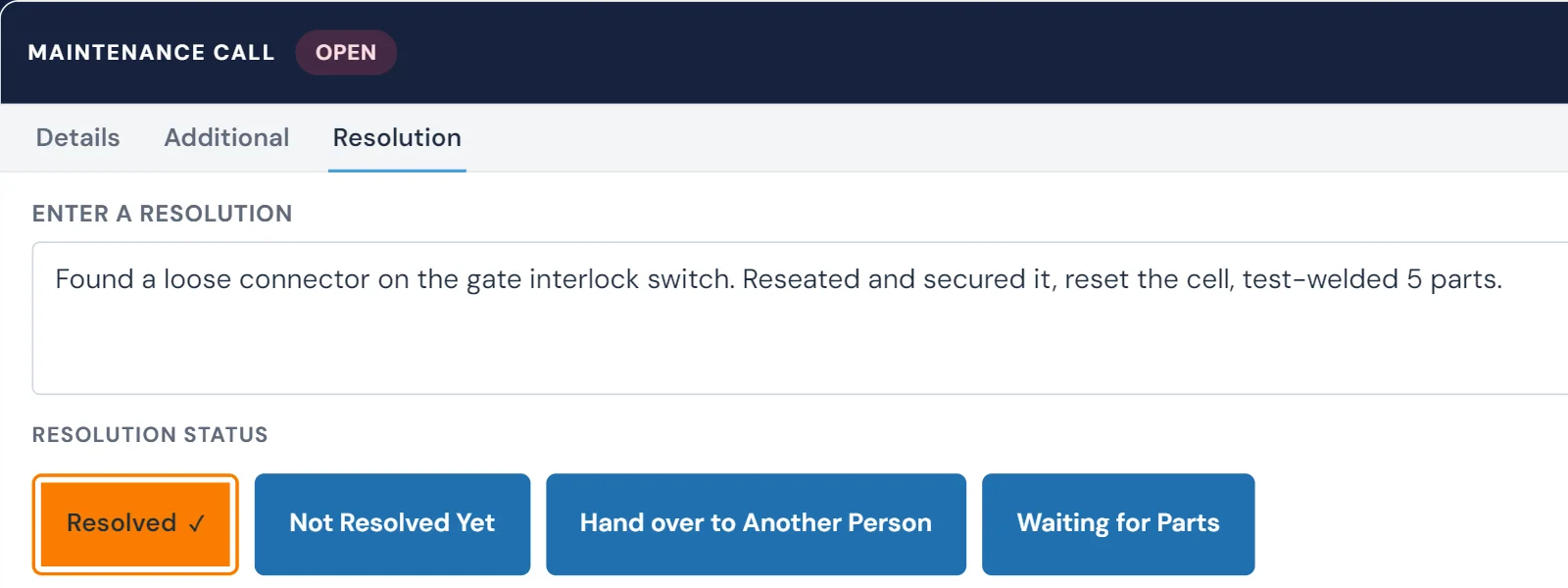
He writes what he found and did, marks it Resolved and closes the issue. Not Resolved Yet, Hand Over and Waiting for Parts keep it open instead.


What each call leaves on the board and in the history
- Active calls for assistance on the floor
- Which type of support is being requested
- Who was notified and who responded
- Response time and resolution time for each call
- Open calls on Andon boards and display screens, with alerts by email or SMS
- Recurring call types and high-demand departments
- Trends showing where support issues are affecting production
- The issue record behind each escalation
Repeat calls point at the weak spot
The same call type coming back week after week, or one kind of call that always takes too long to close, shows where support coverage is thin and where recurring losses are building.
Response time is four delays, not one
"Maintenance took 40 minutes" usually hides several separate waits. Each one has a different fix, so it pays to measure them separately.
- 1
Noticing the problem
How long before someone realises the line needs help. Machine-detected stops and a live status board shrink this to seconds. Glossary: MTTD.
- 2
Reaching the right person
Walking to find a supervisor, a radio shout nobody answers, a text to the wrong phone. A call routed by type goes straight to the group that handles it.
- 3
Getting someone there
The time from the call to a person responding at the line. This is the number people usually mean by "response time". Glossary: MTTA.
- 4
Fixing and confirming it
Diagnosis, parts, the repair, and confirming the line is running again. Long repairs point to parts, skills or a recurring failure. Glossary: MTTR.
What to measure every week: median response time and resolution time by call type, area and shift; the slowest ten calls and why; calls still open; and machines with repeat calls. Averages hide the calls that hurt, so look at the slow tail as well.
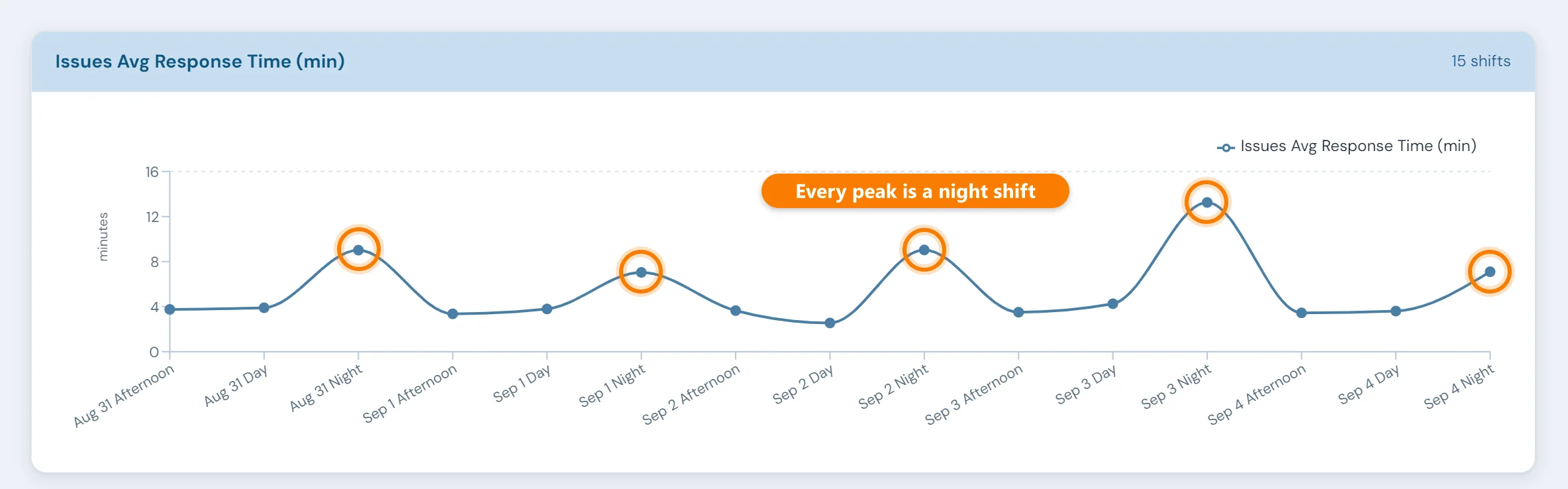
What usually shows up: slow responses clustered on one shift or in one area (a coverage problem), calls going to the wrong group (a routing problem), or the same machine calling again and again (a reliability problem that belongs in maintenance work orders, not faster firefighting).
Status your crew and management can see without asking
Much of a maintenance manager's day goes on answering "is anyone on it?" and "when will it be running?". When every call carries its own status, those questions answer themselves.
- For the crew: an Andon board showing every open call, what kind of help it needs, whether it is waiting or being handled, and how long it has been open.
- For supervisors: the call arrives by board, email or SMS, depending on how your deployment is set up, and stays visible until it's resolved.
- For management: response and resolution times by area, call type and time period, taken from the call records rather than someone's recollection, plus the open calls and the recurring ones.
- For follow-up: the issue behind a call can be tracked in the Issues Tracker, and equipment calls can create maintenance work orders automatically.
“10in6 is used extensively for everything from productivity reporting, supporting our Andon Call system, managing our quality check sheets and traceability on our most critical components. The product is very easy to use and implement and our staff has embraced it from our shop floor operators up to our management team.”
Where call records show up in the rest of MES
Andon Calls questions
- How do you get alerts for production issues?
- Two ways: automatically, when a machine stops or a value moves out of range, and manually, when an operator calls for help. In 10in6, operators raise Andon calls from the Operator Console, and each call type is routed to the group that handles it, such as maintenance, quality, team leaders or material handling. Depending on the deployment, calls appear on Andon boards and real-time displays and can also go out by email or SMS. A call stays visible until someone responds and resolves it.
- What's the best way to track response time to machine stops?
- Record three moments for every call: when it was raised, when someone responded, and when it was resolved. Response time is the gap between the first two, and repair time the gap between the last two. Writing these down by hand rarely survives a busy shift, so capture them in the system that raises the call. 10in6 records who responded along with response and resolution timing, so response performance can be reviewed by call type, area and time period.
- How do we reduce maintenance response time?
- Make the call instant and specific, so it goes to the group that handles that call type instead of out as a general radio shout. Make every open call visible, on boards for the floor and in reports for management, so nothing waits unnoticed. Then review response times every week and look for where the slow ones cluster: a shift, an area, or a call type. That usually points to a staffing, coverage or escalation gap you can fix.
- How do you communicate issue and fix status to your team and to management?
- Give each audience its own view of the same record. The crew needs a board showing every open call and its status (waiting, responded, resolved) with the time elapsed. Supervisors need alerts when calls come in. Management needs a regular summary of response and resolution times by area, shift and call type, plus a list of anything still open. When all three come from the calls themselves, nobody has to write a status update and nobody argues about the numbers.
- What should a shop floor alert system record?
- At minimum: the machine or line, the call type, who raised it and when, who acknowledged or responded and when, when it was resolved, and notes on what was done. With those fields you can report response time, resolution time, recurring call types and open calls by shift. In 10in6 each Andon call carries this record, and the issue behind a call can be followed up in the Issues Tracker.
- What types of Andon calls can be created?
- Calls can be configured for the types of support your plant needs, such as maintenance, quality, team leaders, material delivery, management, and more.
- How are people notified?
- Open calls show on Andon boards and Real-Time displays. Depending on the deployment, they can also be sent to people by email or SMS.
- Can the system track who responded?
- Yes. The workflow can record who responded to the call, along with response and resolution timing.
- Can Andon calls be customized for our process?
- Yes. Call types and routing workflows can be configured to match your operation and the support groups involved.
- What happens after a call is triggered?
- The call remains visible within the workflow until it is addressed, helping supervisors and support teams track the issue through to resolution.
- Can we report on recurring call types?
- Yes. Historical reporting can be used to review call patterns, response performance, and the types of issues that occur most often.
- Does this integrate with the Operator Console?
- Yes. Andon Calls can be triggered directly from the 10in6 Operator Console.
Set up around how your plant runs
Standardized platforms expect the plant to change to fit the software. Do-it-yourself platforms leave your team to build and maintain everything. With 10in6, we configure the system around your equipment, codes and reports, and your team runs it day to day.
Your equipment, codes and reports
Andon calls routed by call type to the technicians on your crew, following the escalation each shift uses.
Your team runs it day to day
Operators, downtime and scrap codes, products and targets, shift schedules, checks, alerts, emailed reports and real-time boards are managed by your own people. Everyday changes need no support ticket and no invoice.
A project manager for the bigger things
New machines, new modules and custom reports go through a 10in6 project manager who already knows your deployment, so nothing starts from scratch. If you would rather we made everyday changes too, we can.
Still here years later
The system keeps being refined after go-live, and new capabilities are added without rebuilding it. Some of our customer relationships have run for 12 years, and 97% of customers say they would never go back.
“[Our 10in6 project manager] has been great to work with. He is very responsive, quick to help and provides solutions, whether we have random questions, new requirements or the rare times we have system issues.”
How the 10in6 delivery model works →
Find out where your response time is going.
Tell us how calls for help work on your floor today. We'll show you what it looks like when every call is routed by type, visible until it's fixed, and timed from start to finish.
Free 30–60 minute call with one of our engineers.