
See Performance As It Happens
Shop-floor boards, supervisor screens and phone views that show each line's output against target, and which machines are down, while the shift is still running.
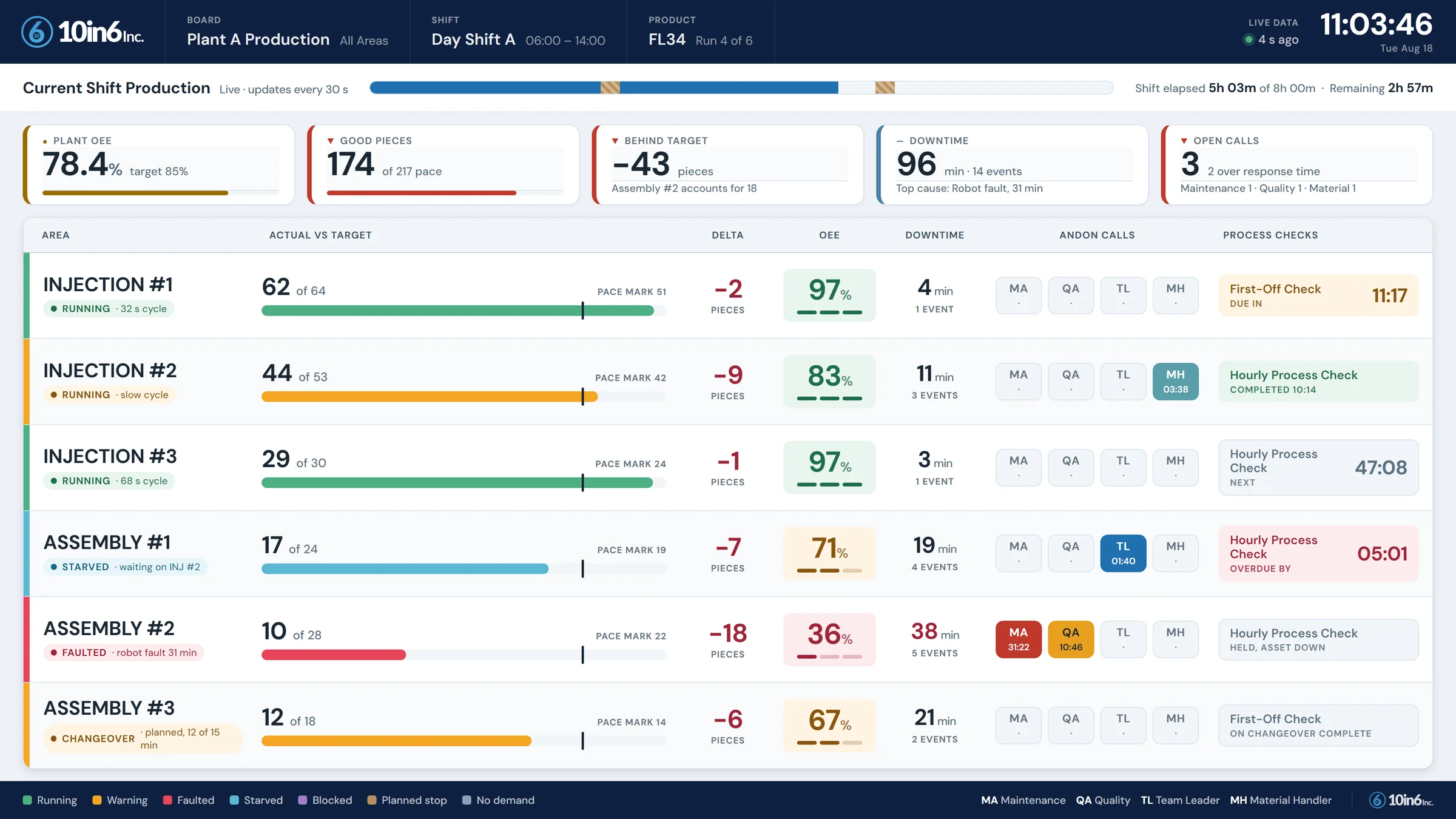
Line 3 was 40 parts behind by 10 a.m. The shift found out at 3 p.m.
The count was in the machine and the target was in the planner's spreadsheet, so nobody on the floor could put the two together. The supervisor had a feeling the line was slow, with nothing current enough to act on. One station had dropped off pace, the crew didn't know how far they had drifted, and the shortfall first appeared in the end-of-shift report.
By then the shortfall could be explained, but none of it could be made back. With the count next to the target on a board at the line, the gap would have shown at 10 a.m., with most of the shift left to recover it.
From the machine to the screen in front of the line
Data comes from the equipment as it runs
10in6 collects counts, rates and machine states from connected equipment, other plant systems and operator workflows as they happen. A view can cover one line, a department or the whole plant.
Screens drawn to look like your process
A display can be laid out like the line itself, using graphics, shapes, numbers and status indicators. Values that need attention can be highlighted in color, so a stopped machine stands out without anyone reading a table.
Performance is measured against live targets
Each line's live output is shown against its current target, so the crew can tell whether it is on pace, falling behind or catching up.
Boards, desktops and phones
Depending on the deployment, views run on large display boards, desktops, operator screens and mobile devices. Each layout is built for where it will be read: a TV at the end of a line needs fewer, bigger numbers than a supervisor's desktop.
Plant communication can be part of the same view
In some environments, 10in6 can also show PowerPoint and HTML content on the display boards, so a safety notice or a plant announcement appears on the same screens as the live production data.
What it looks like
| Area | Target | Actual | OEE | Scrap |
|---|---|---|---|---|
| RT118 | 536 | 80 | 15 | 0 |
| RT120 | 222 | 183 | 82 | 0 |
| RT122 | 225 | 189 | 84 | 2 |
| RT124 | 229 | 189 | 83 | 1 |
| RT126 | 579 | 588 | 102 | 4 |
| RT128 | 536 | 438 | 82 | 1 |
| RT130 | 1547 | 448 | 29 | 0 |
| RT132 | 1554 | 640 | 41 | 0 |
| C1369 S1 | 833 | 920 | 110 | 0 |
| C1369 S2 | 833 | 0 | 0 | 0 |
| C1371 S1 | 833 | 706 | 85 | 0 |
| C1372 | 660 | 518 | 78 | 0 |
| C1374 | 1050 | 708 | 67 | 4 |
What to put on a shop-floor board
- One board per audience. Operators need their line's pace and current state; supervisors need every line in their area; managers need the exceptions.
- Pace against target. "412" means nothing; "412 of 450, 8% behind" means act now.
- The current state and why. Down, changeover, waiting for material, with the reason and how long.
- Colour only for exceptions. If everything is coloured, nothing stands out. Keep it readable from across the floor.
What a real-time board can carry
- Output, counts and rates for any line or area
- Each line's pace against its current target
- Machine and line state, with exceptions picked out in color
- Layouts drawn to match your own process
- The same view on a floor board, a desktop or a phone
- Plant announcements alongside the production numbers
Modules that feed the boards or act on what they show
Real-Time Data questions
- How do you get real-time production visibility?
- Connect the machines so counts and run or stop status arrive without anyone typing them in. Give each line a target rate so progress can be shown against pace instead of as a running total. Then put it where decisions are made: boards at the line for operators, desktop screens for supervisors, and phones for managers. Colour-code the exceptions so nobody has to read numbers to spot a problem. 10in6 real-time displays are configured to your own lines and process flow, and can cover a single line or the whole plant.
- Can our own team build and change real-time boards?
- Yes. With the 10in6 board builder, your team can create and change real-time boards themselves, choosing what each screen shows for its line or area, without waiting on us.
- What kind of information can be shown in a real-time display?
- That depends on the deployment, but it can include production counts, rates, targets, machine or line status, exceptions, and other live process data.
- Can the displays be customized to match our process?
- Yes. Views can be built to visually reflect your lines, departments, and process flow using graphics, shapes, numeric values, and status indicators.
- Can we show performance against targets in real time?
- Yes. 10in6 can display live performance against current targets so teams can quickly see whether they are on pace.
- Where can the displays be viewed?
- Depending on the deployment, real-time views can be shown on large display boards, desktop screens, operator stations, and mobile devices.
- Can important values be color coded?
- Yes. Values can be color coded or highlighted so the ones that need attention stand out at a glance.
- Can we include plant announcements or other communication on the screen?
- In some environments, yes. 10in6 can support PowerPoint and HTML content as part of the display workflow alongside live production data.
- Is this only for one line?
- No. The module can be used to show live visibility for a single line, a department, or the entire plant.
Set up around how your plant runs
Standardized platforms expect the plant to change to fit the software. Do-it-yourself platforms leave your team to build and maintain everything. With 10in6, we configure the system around your equipment, codes and reports, and your team runs it day to day.
Your equipment, codes and reports
Your machines, your ERP, your part numbers, your shift structure and your reports.
Your team runs it day to day
Operators, downtime and scrap codes, products and targets, shift schedules, checks, alerts, emailed reports and real-time boards are managed by your own people. Everyday changes need no support ticket and no invoice.
A project manager for the bigger things
New machines, new modules and custom reports go through a 10in6 project manager who already knows your deployment, so nothing starts from scratch. If you would rather we made everyday changes too, we can.
Still here years later
The system keeps being refined after go-live, and new capabilities are added without rebuilding it. Some of our customer relationships have run for 12 years, and 97% of customers say they would never go back.
“Our 10in6 Project Manager has been very responsive and the software is flexible enough to be configured to our specific needs.”
How the 10in6 delivery model works →
See your floor as it runs, not the next morning.
Tell us which lines matter most and who needs to see what. We'll show you boards built around your lines, your targets and your shifts.
Free 30–60 minute call with one of our engineers.