
Track Recurring Problems and Keep Improvement Work Moving
Log plant issues, assign owners, track actions, and connect problems to production impact so your team can focus on what is costing the most.
10in6 turns recurring issues into a structured workflow with ownership, visibility, and full history.
Everyone knows the recurring problems. Few get tracked until they're fixed.
Problems get discussed in meetings, written into spreadsheets, or logged in different places. Actions are assigned loosely, deadlines move, and the same issues keep coming back without enough visibility or accountability.
So the same problems come up at every meeting, and what they cost stays hidden until something bigger breaks.
From first log to final resolution — tracked and visible.
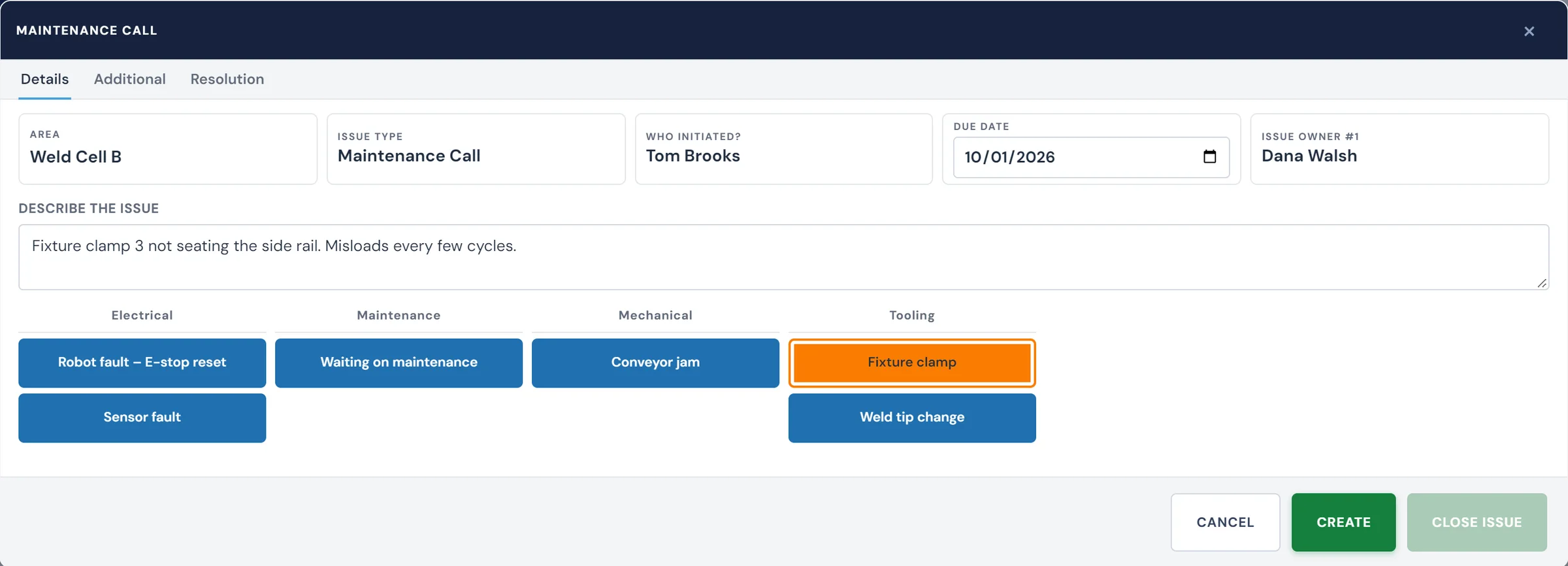
Log and assign issues
Create issues with a description, category, priority, owner, and due date so the team has a clear record of what needs to be addressed. Any team member can log an issue, from the Operator Console at the line or from a desk, and it is immediately visible across the organization.
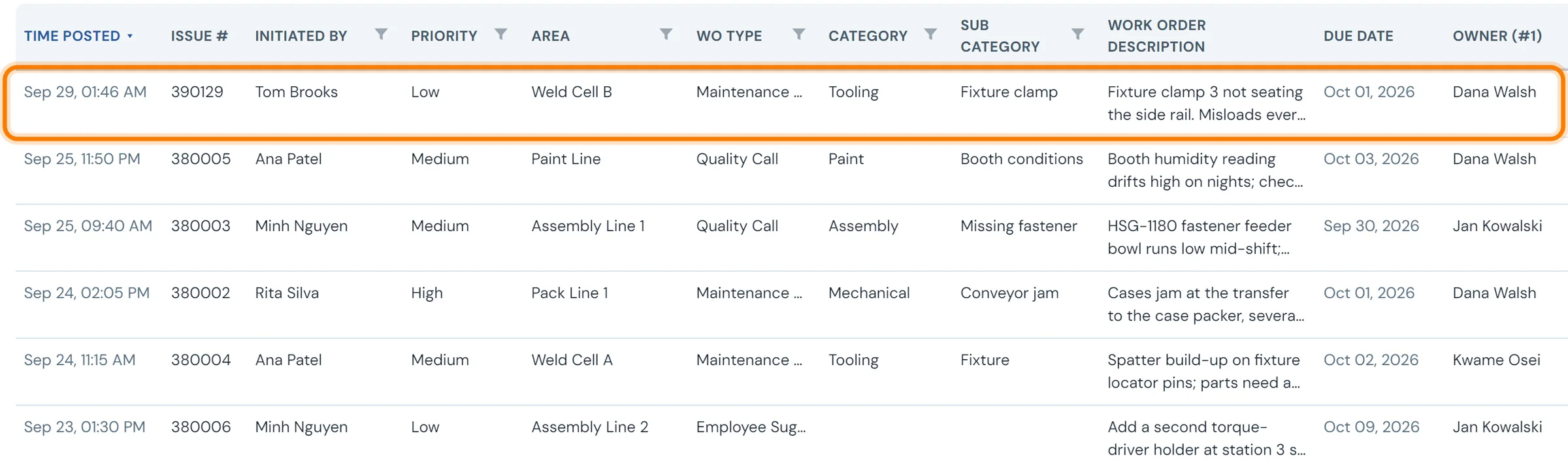
Track actions and status
Update issues as work progresses, reassign ownership when needed, and keep a visible record of actions, deadlines, and resolution status. Every update is logged with a timestamp and the name of the person who made it.
Connect issues to plant performance
Each issue can carry the lost production and downtime behind it, so the review starts with the problems costing the most output instead of the ones reported most recently.
Open issues, owners, actions, and history in one place.
With 10in6 Issues Tracker, your team can see:
- Open issues, owners, priorities, and due dates
- Improvement actions and resolution status
- Recurring issues by category or area
- History of actions taken and outcomes
- Which problems are costing the most production
- A centralized alternative to spreadsheet-based Kaizen tracking
When a repeat failure should become an issue
A work order fixes the machine. It doesn't ask why the same thing broke again. A simple rule keeps repeat failures from hiding in closed work orders: when the same failure hits the same machine three times in 30 days, open one issue, give it an owner, and keep it open until the failure stops. Pick your own threshold; what matters is that there is one.
| Spreadsheet or meeting notes | Issues tracker | |
|---|---|---|
| Ownership | A name in a column, often "maintenance" | One owner, reassigned on the record when it changes |
| Due dates | Checked when someone opens the file | Alerts when an issue is assigned, due, overdue or updated |
| History | Overwritten each week | Every update timestamped and attributed |
| Priority | Whoever is loudest in the meeting | Ranked by the production and downtime impact tied to it |
| Closing | Row deleted or turned grey | Remains open, and visible to everyone, until the problem is fixed |
Keep the list honest: one next action per issue, reviewed at a fixed meeting every week, and closed only when the failure has stayed away for an agreed period. MTBF by machine is a good check that a closed issue actually fixed something.
The bigger problem this solvesHow to reduce unplanned downtime →Repeat failures are one of the biggest sources of lost hours. See how downtime is captured, ranked and worked down.Issues Tracker works with:
Issues Tracker — FAQ
- What is an issues tracker in manufacturing?
- A shared list of recurring or systemic plant problems, each with an owner, a due date, a status and a history of actions, so problems are worked through to root cause instead of re-discussed at every meeting. It complements work orders, which handle individual repairs.
- Can we track issues in Excel instead?
- You can, at first. A spreadsheet works while the list is short and one person maintains it. It breaks down when owners change, due dates pass unnoticed, history gets overwritten and nobody can tell which issues cost the most production. A tracker keeps ownership, alerts, history and downtime impact on each issue.
- What is the difference between the Issues Tracker and Work Orders?
- Work Orders are for specific maintenance jobs — a repair, a PM check, a technician task. The Issues Tracker is for recurring or systemic plant problems that need investigation, ownership, and follow-through over time. An issue might generate multiple work orders before it is resolved.
- Who can log and update issues?
- Issues can be created by operators, supervisors, maintenance leads, or management — anyone with system access. Once created, issues are assigned an owner who is responsible for driving them through to resolution. All updates are timestamped and attributed to the person who made them.
- Can issues be connected to production or downtime data?
- Yes. Issues can be tied to production and downtime data so teams can see which recurring problems are having the biggest operational impact. This helps prioritize improvement work based on what is costing the most output, not just what is the most visible.
- How do we track the status of improvement actions?
- Each issue has an ongoing resolution log where updates, actions, and status changes are recorded. Ownership can be reassigned as needed, and the issue stays open with a visible status until it is genuinely resolved — not just acknowledged.
- How does this replace spreadsheet-based Kaizen tracking?
- The Issues Tracker gives you a centralized, structured system that replaces scattered spreadsheets and shared documents. Issues are logged consistently, owners are accountable, due dates are visible, and the full history is always on record — making it easier to run improvement reviews and see what has actually been done.
- Can we set due dates and get notifications on overdue issues?
- Yes. Each issue can have a due date, and alerts can be configured to notify owners and supervisors when an issue is assigned, approaching its deadline, overdue, or updated. This keeps the team informed without requiring manual follow-up.
Set up around how your plant runs
Standardized platforms expect the plant to change to fit the software. Do-it-yourself platforms leave your team to build and maintain everything. With 10in6, we configure the system around your equipment, codes and reports, and your team runs it day to day.
Your equipment, codes and reports
Andon calls routed by call type to the technicians on your crew, following the escalation each shift uses.
Your team runs it day to day
Operators, downtime and scrap codes, products and targets, shift schedules, checks, alerts, emailed reports and real-time boards are managed by your own people. Everyday changes need no support ticket and no invoice.
A project manager for the bigger things
New machines, new modules and custom reports go through a 10in6 project manager who already knows your deployment, so nothing starts from scratch. If you would rather we made everyday changes too, we can.
Still here years later
The system keeps being refined after go-live, and new capabilities are added without rebuilding it. Some of our customer relationships have run for 12 years, and 97% of customers say they would never go back.
“[Our 10in6 project manager] has been great to work with. He is very responsive, quick to help and provides solutions, whether we have random questions, new requirements or the rare times we have system issues.”
How the 10in6 delivery model works →
Stop letting recurring problems live in spreadsheets and meetings
Log issues, assign ownership, track actions, and connect problems to the production impact they are causing.