
Scrap Tracking That Shows What Was Lost, Why It Was Lost, and Where to Fix It
Track scrap as it happens, capture the reason behind it, and give your team the visibility to reduce recurring loss instead of just recording it at the end of the shift.
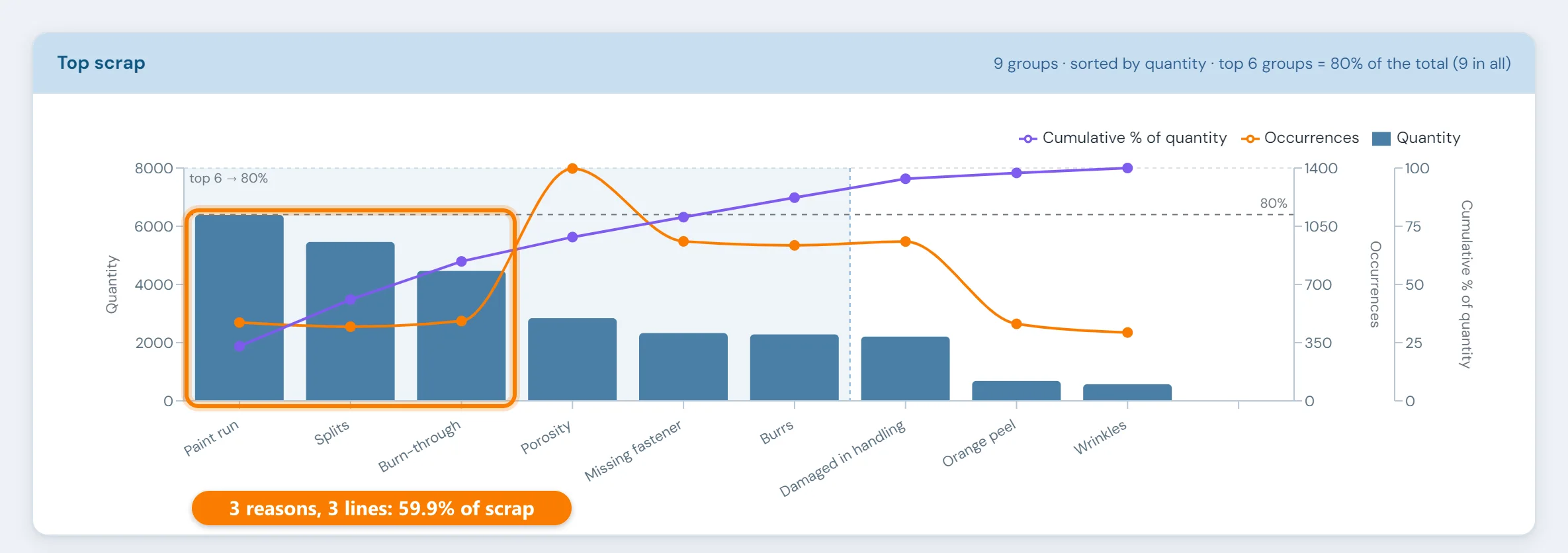
The shift report shows a scrap total, and nothing about why.
Scrap is often recorded in broad categories, entered at the end of the shift, or rolled into a daily total. None of those shows where it happened, why, how often the same reason comes back, or what it cost.
By the time anyone looks at the number, the shift has moved on, and the conversation is about explaining the loss rather than preventing the next one. The quality signal inside the scrap gets weaker too: captured late or lumped together, recurring causes stay buried. (Scrap is the production-side face of the quality losses in the Six Big Losses, and finding the recurring ones depends on Pareto analysis done well.)
Two ways in, one scrap record
Automatically, from the machine
Where a machine rejects parts itself, such as a reject station, a vision check or a leak tester, 10in6 counts the scrap straight from the PLC, together with the reason the machine reports. Nobody has to write it down, and nothing gets lost at the end of a busy shift.
Entered by the operator
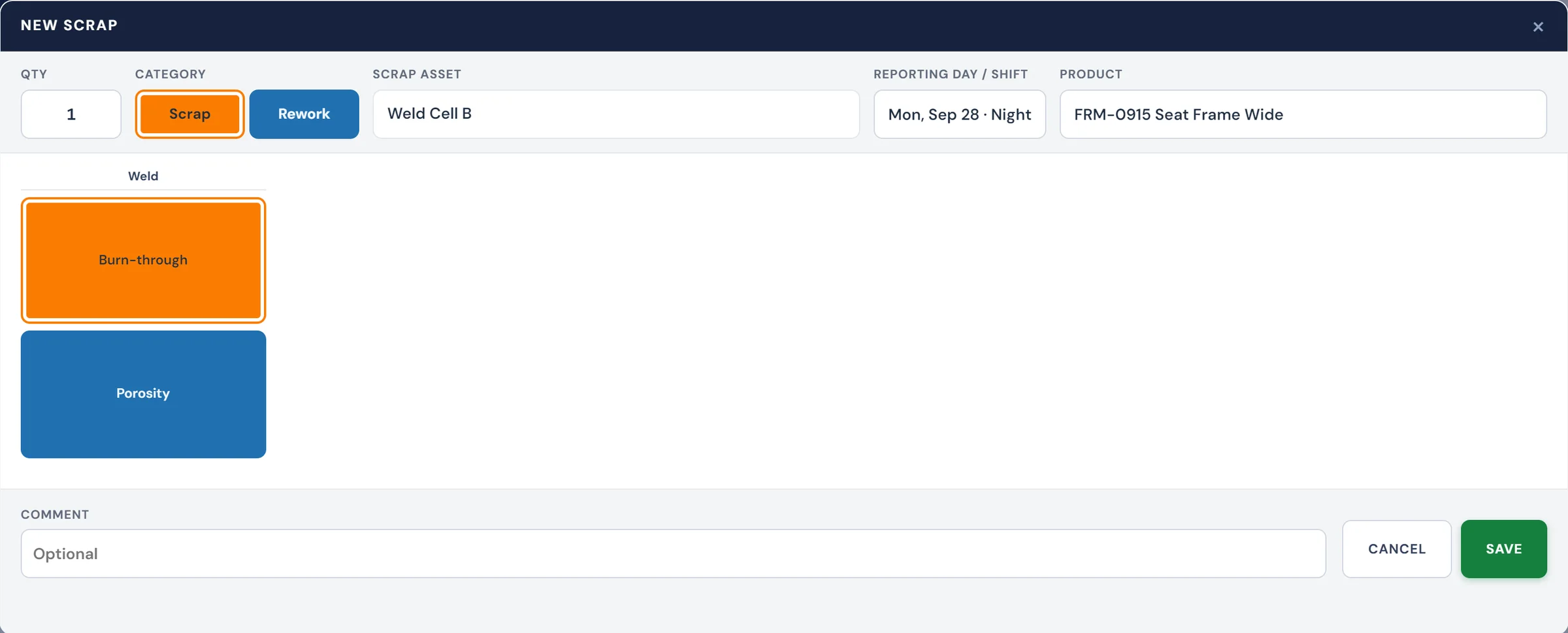
When scrap comes down to someone's judgement, like a visual reject or a part damaged in handling, the operator enters it at the Operator Console: the quantity and a reason from a short list set up for that line, at the moment it happens.
What you can see
Causes, ranked
Reason codes turn scrap into a Pareto of causes, so the few reasons behind most of the loss stand out. Weigh them by what each reject costs, too (see the worked example below).
Down to the line, shift, product or run
Start at the plant total and drill down until you can see exactly where a loss is concentrated, including a single production run or your own identifiers such as a lot or a customer.
Trends, and proof a fix worked
See which reasons are growing, which are steady, and whether a fix brought a reason down, rather than relying on how the last few shifts felt.
In the same reports as output and OEE
Scrap feeds the Quality factor of OEE and shows up in shift and daily reports next to output and downtime, so it's reviewed with everything else instead of in a separate spreadsheet.
Rank scrap by what it costs as well as how often it happens
A part gains value at every operation, so the same scrapped piece costs more the later it's caught. One week of scrap on a painted assembly:
| Reason | Where it's caught | Pieces | Cost each | Cost |
|---|---|---|---|---|
| Short shot | Molding (first operation) | 300 | $2 | $600 |
| Paint run | After painting | 40 | $45 | $1,800 |
| Wrong label | Final pack | 12 | $120 | $1,440 |
By count, short shots are the problem: 300 of 352 pieces. By cost, they're the smallest line: $600 of $3,840. Paint runs and wrong labels together cost more than five times as much. The wrong label is also the one a poka-yoke can eliminate outright.
The bigger problem this solvesWhy the same defects keep coming back →Scrap is where recurring defects show up on the bill. See the practices that stop them being made in the first place.Where scrap records are used next
Scrap tracking questions
- How do you reduce scrap in manufacturing?
- Capture scrap at the machine with a reason, rank the reasons by cost, and work the top one or two until they shrink: find where and when they happen, fix the cause, and error-proof it if you can. Catch defects as early in the process as possible, because a part scrapped after three more operations has cost three operations' worth of time and material. Then confirm in the data that the reason has actually dropped.
- Should scrap be ranked by count or by cost?
- Both, but decisions should follow cost. A cheap defect at the first operation can top the count while barely registering in dollars, and a handful of finished parts scrapped at packing can cost more than hundreds of early rejects. Ranking by cost puts improvement effort where the money is.
- How are production, scrap reason codes and quality defects linked in the data?
- Through a shared frame of machine, time, shift and product. Production is recorded as blocks of time for each machine, each carrying the reporting day, shift, product and production run in effect. A scrap entry records its machine, shift, product, quantity and a reason code with up to two levels, and is attributed to the production record it belongs to. When scrap comes from a visual inspection, it is also linked to that defect record. Because everything shares the same frame, scrap can be reported by line, shift, product or reason next to output, and feeds the Quality factor of OEE.
- What can 10in6 track as scrap?
- 10in6 can track scrap events within the production process and associate them with the context that matters to your operation, such as line, shift, product, reason code, and operator.
- Can we use scrap reason codes?
- Yes. Scrap can be categorized using reason codes so the team can analyze what is driving the loss instead of only looking at total quantity.
- Can scrap be analyzed by line, shift, or product?
- Yes. Scrap can be reviewed across the operational dimensions that matter, including line, shift, product, and time period.
- Can scrap be captured automatically?
- Yes, where the machine knows it has rejected a part. 10in6 counts scrap straight from the PLC, from a reject station, vision check or tester, together with the reason the machine reports, so nothing depends on someone writing it down. Where scrap is a person's call, such as a visual reject or handling damage, the operator enters the quantity and a reason at the Operator Console as it happens. The two methods usually run side by side.
- How does scrap connect to OEE?
- Scrap contributes to Quality loss, which affects overall OEE. Scrap Tracking helps explain where that loss is coming from so the team understands what is behind the Quality component of OEE.
- When do we need Scrap by Component?
- Start with Scrap Tracking. Scrap by Component becomes useful when assemblies are more complex and the team needs to know which specific components inside the assembly are driving repeated loss.
- Can scrap be included in production reports?
- Yes. Scrap can be included in broader production reporting so output, downtime, OEE, and quality loss are reviewed together in one place.
Set up around how your plant runs
Standardized platforms expect the plant to change to fit the software. Do-it-yourself platforms leave your team to build and maintain everything. With 10in6, we configure the system around your equipment, codes and reports, and your team runs it day to day.
Your equipment, codes and reports
Your checks, intervals and forms set up per line and product, and traceability built around your part numbers and your customers’ requirements.
Your team runs it day to day
Operators, downtime and scrap codes, products and targets, shift schedules, checks, alerts, emailed reports and real-time boards are managed by your own people. Everyday changes need no support ticket and no invoice.
A project manager for the bigger things
New machines, new modules and custom reports go through a 10in6 project manager who already knows your deployment, so nothing starts from scratch. If you would rather we made everyday changes too, we can.
Still here years later
The system keeps being refined after go-live, and new capabilities are added without rebuilding it. Some of our customer relationships have run for 12 years, and 97% of customers say they would never go back.
“Our 10in6 Project Manager has been very responsive and the software is flexible enough to be configured to our specific needs.”
How the 10in6 delivery model works →
Find out what your scrap is costing.
Tell us how scrap is recorded today. We'll show you scrap by reason, line and product, captured at the machine, and ranked by what it costs.
Free 30–60 minute call with one of our engineers.