
Know the Moment a Machine Stops. Know Why Before the Shift Ends.
Stops are timed from the machine as they happen and operators add the reason at the line, so your team can rank lost time and work down the list instead of explaining it later.
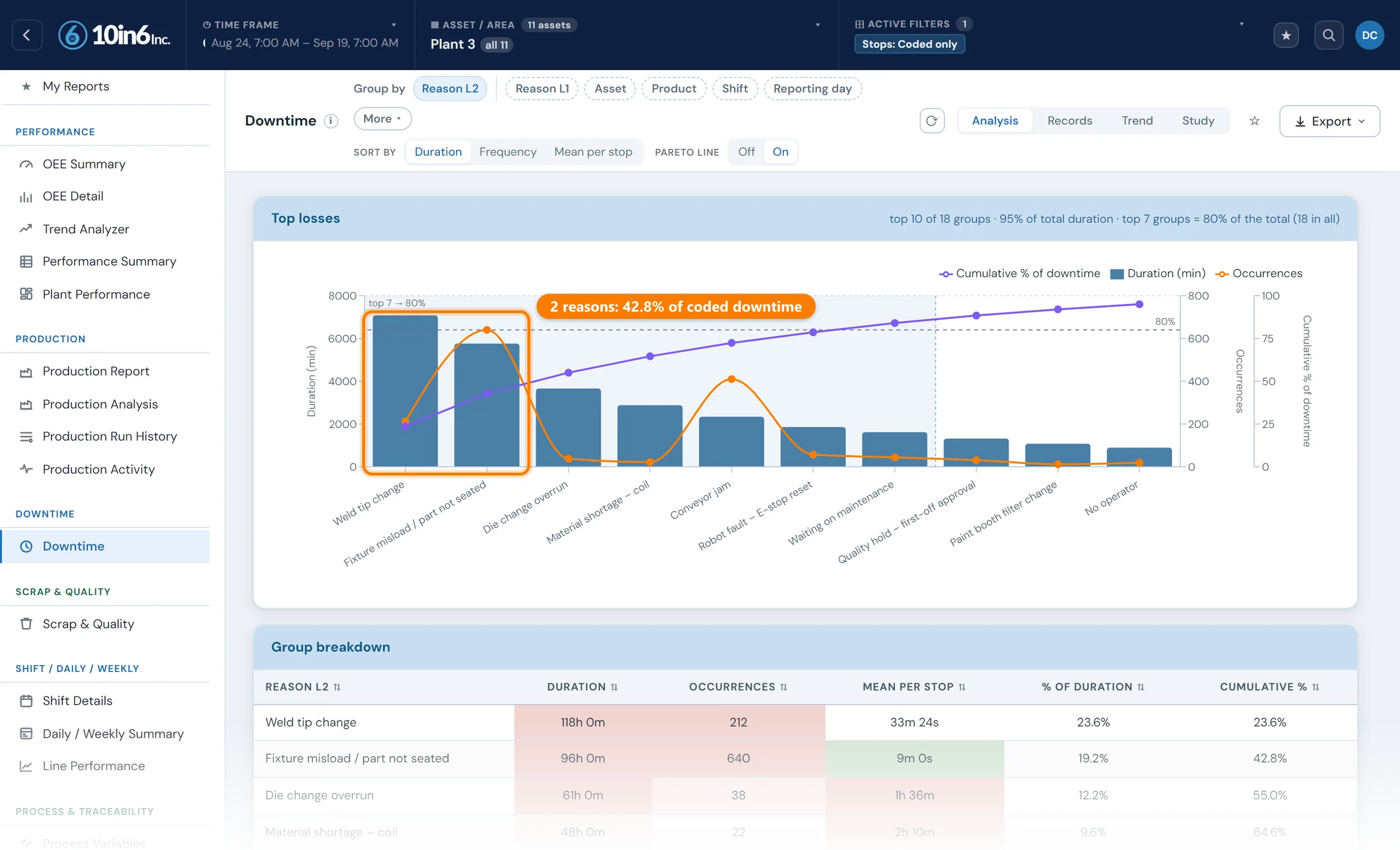
Downtime gets recorded. It rarely gets measured.
What's usually missing is a reliable record of when a stop started, why it happened, how long it lasted, and how much production it cost.
A press stops at 2:10. At the end of the shift the supervisor asks what went wrong, hours after the line started running again, and a reason gets written down from memory or notes, often under a broad category that hides the cause. The duration is an estimate and the reason is a guess.
Everything built on that record inherits the guess. Pareto charts point at the wrong priorities, recurring stops get buried, and MTBF and MTTR lose their meaning. Teams hear about problems but can't see which ones cost the most.
Short stops suffer most. A two-minute jam that happens thirty times a shift rarely makes it onto a paper log, yet it can cost more than the one long breakdown everyone remembers.
Three ways plants record downtime, and what each one misses
| Written up at end of shift | Entered by operators as it happens | Detected by the machine, reason from the operator | |
|---|---|---|---|
| Start and end time | Estimated, often rounded to the nearest 15 or 30 minutes | Close, but depends on when someone gets to the screen | Exact, taken from the machine's own run/stop signal |
| Short stops | Usually missing | Often skipped when the line is busy | Every stop is recorded, however short |
| Reason quality | Broad categories picked from memory | Good while the event is fresh | Good, and uncoded stops stay visible until someone codes them |
| Effort | A supervisor or clerk re-types it later | Operators have to start and stop every event | Operators only pick a reason |
10in6 uses the third method wherever a machine or PLC signal is available, through the Operator Console at the line. See Machine & PLC Connectivity for how equipment is connected, and how production data gets from a PLC into an MES for the signals and machine states behind it.
How 10in6 Downtime Tracking works
The stop is detected automatically
In many environments 10in6 takes the stop straight from the machine's run/stop signal or the PLC, so the system knows the moment production stops instead of waiting for someone to record it later.
Machines without a usable signal can still be tracked: the operator records the stop at the Operator Console, and it joins the same record.
The stop can also trigger related workflows, such as putting it on the Andon displays.
The reason is captured while it is happening
Operators can enter the reason code while the stop is still active or immediately after it ends, at the station where it happened.
The duration is measured from stop to restart
Each event's duration runs from the machine's stop signal to its restart, so a seven-minute stop is recorded as seven minutes.
The events build into patterns over time
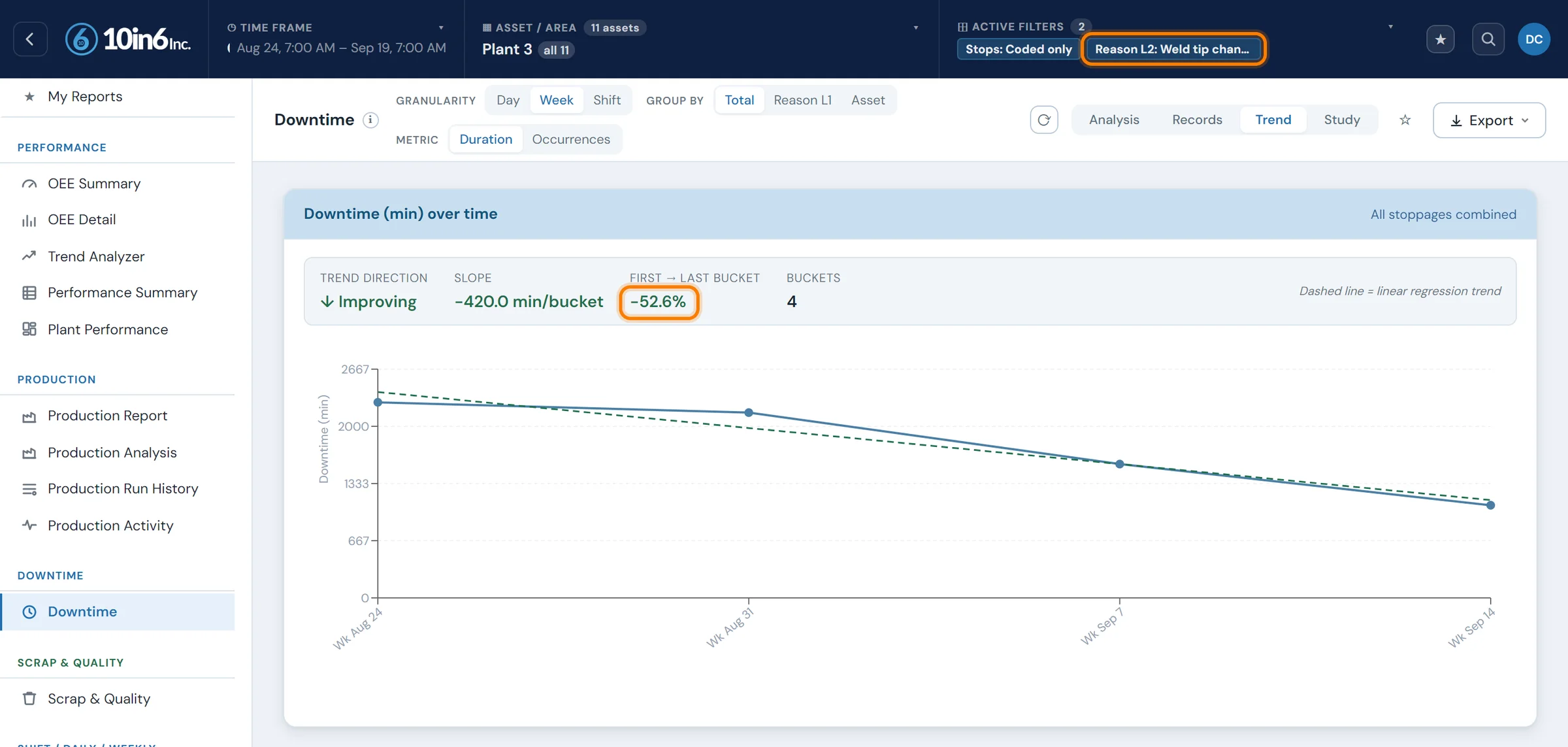
Over weeks, the events can be trended by reason code, compared across lines and shifts, and ranked to find the recurring stops worth fixing first.
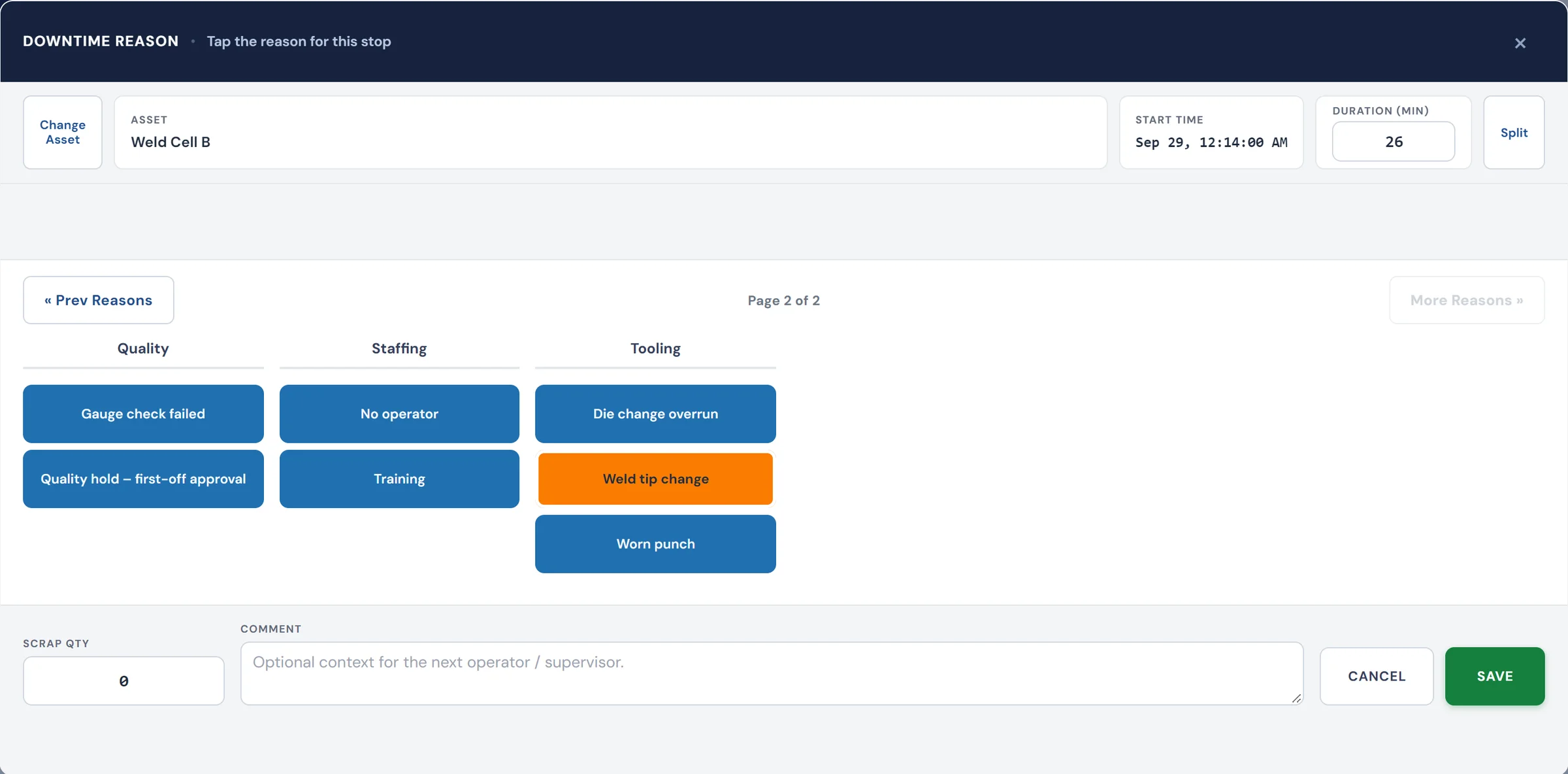
How the downtime record breaks down
- Downtime by machine, line, shift, product, and time period
- Planned vs. unplanned downtime
- Recurring reason codes and chronic stoppages
- Stop frequency and stop duration
- Downtime trends over time
- The events contributing to OEE loss
- The downtime history behind maintenance follow-up
What makes the ranking worth acting on
Each bar on the Pareto is a sum of stops timed by the machine and coded at the line, so the order of the bars reflects lost time rather than which stops people remembered.
“We can track all the downtime reasons and react to the bigger issues that cost the most production. Once those are out of the way we can attack smaller and smaller issues based on the pareto charts from 10in6.”
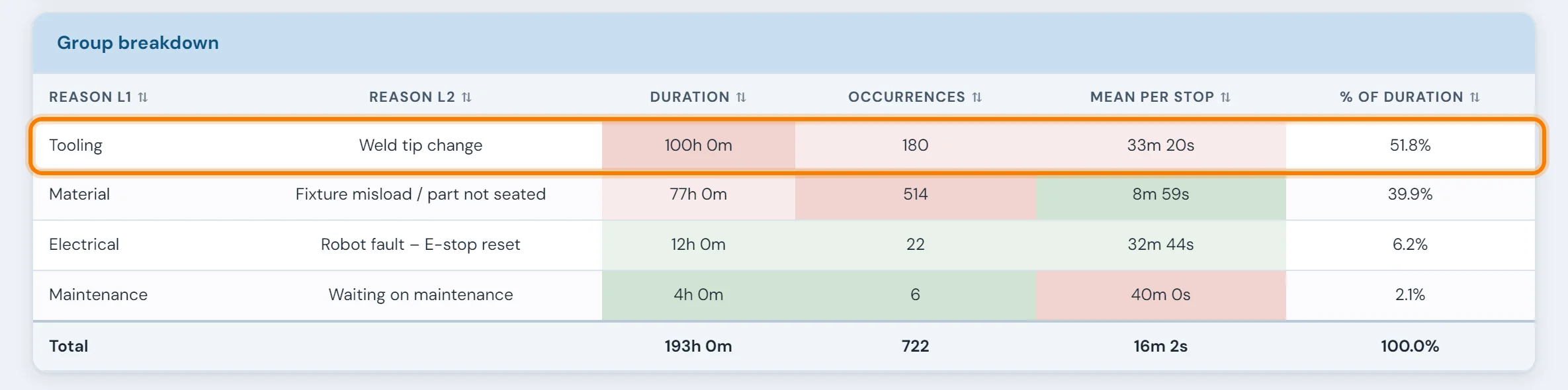
The reason code list decides whether the data is usable
Automatic detection gives you the time. The reason still comes from a person, and the list they choose from shapes everything downstream. When downtime data can't be trusted, the reason list is more often at fault than the capture.
- Too many codes at the top level. Operators under pressure pick the first plausible option, and "Other" or "Miscellaneous" becomes the biggest bar on the Pareto.
- The same list for every machine. A press and a packaging line fail in different ways. Codes that do not apply to a machine should not appear on its screen.
- Detail in the wrong places. A second level is worth adding where it changes the next action, for example which station on a welder, or which material on a feeder.
- Nobody reviews it. A list that is never pruned grows stale. Check every few months which codes are never used and which ones hide several different causes.
We cover this in detail, including how to validate the data once it is flowing, in Why Your Downtime Reason Codes Are Lying to You.
Downtime is only part of the lost production
In OEE terms, downtime drives the Availability loss. Output lost while the line is running sits in Performance: slow cycles, minor stops too short to register as downtime, and speed loss.
A plant that only tracks downtime will eventually run out of stops to fix and still be short. That is why 10in6 tracks downtime alongside actual output against the expected rate, so both kinds of loss show up in the same report. See OEE Tracking for how the three factors are built, and OEE the Right Way for the common mistakes.
“Before 10in6 we would have hours with no downtime, where we still didn’t hit our target. We have caught issues where 20 second cycles were taking 21 or 22 seconds, that we never would have seen without 10in6.”
From recurring stops to MTBF and MTTR
Recurring equipment stops are where production and maintenance data meet. When every stop has a real start, end, machine and reason, mean time between failures and mean time to repair can be calculated from events instead of estimated.
Instead of "the welder has been bad lately", the team can see how often it stops, how long each repair takes, and whether a fix made a difference. When 10in6 CMMS is part of the deployment, downtime events can feed work orders directly.
What data you need to start
- A run/stop signal for each machine. Usually already in the PLC. This gives the exact timing of every stop.
- A part or cycle count. Needed to see Performance loss as well as downtime.
- A short reason code list per machine. Start small and refine it once real data shows where the detail is needed.
- Your shift schedule and planned stops. Breaks, meetings and planned maintenance, so they are not counted as losses.
- Someone who reviews it every week. The data only reduces downtime if it drives a regular decision.
What plants did with better downtime data
“The weekly performance report highlights the ‘Big 5’ downtime reasons. I review it every Monday morning with maintenance so we know the key issues from the past 7 days and start the week knowing what needs to be fixed.”
Where the downtime record is used next
Downtime tracking questions
- How do you reduce unplanned downtime?
- Capture every stop from the machine with its real start and end time, attach a reason while the operator still knows it, and rank the reasons by lost time. Fix the few causes that account for most of the lost hours, confirm the result in the data, and review the ranking every week.
- What is the difference between downtime and OEE availability loss?
- They describe the same lost time from different angles. Downtime is the record of individual stops: when, how long and why. Availability is the share of planned production time the equipment was actually running, so unplanned downtime is what drives Availability loss. Slow cycles and very short stops usually show up as Performance loss instead.
- Why do operators log different downtime reasons for the same stop?
- Usually because the reason code list makes it easy. Long top-level lists, overlapping codes, codes that do not apply to that machine, and entry done hours after the event all push operators toward whichever option looks close enough. Each shift then develops its own habits, so the same jam gets coded three different ways.
- How do you get operators to enter downtime reasons consistently across shifts?
- Keep the top level short, show each machine only the codes that apply to it, and add a second level only where the answer changes what someone does next. Ask for the reason while the stop is happening, not at the end of the shift. Then review the codes regularly with supervisors from every shift, retiring the ones nobody uses and splitting the ones that hide several causes.
- How is downtime, scrap and labor data structured in a shop floor system?
- As time-stamped events on a common frame of plant, area, line, machine and shift. Each stop is an event with its machine, start time, duration, shift and reason (a category plus up to two levels). Each scrap entry has its machine, shift, product, quantity and reason. Labor comes from operators signing in and out of a machine or process during a shift. Production records carry the counts and running time for each block of time. In 10in6 all of this sits in one SQL Server database, so each can be reported against the others or queried directly.
- How does 10in6 know when a machine is down?
- In many environments, 10in6 can detect machine stop events directly from connected machine or PLC signals. The exact method depends on the equipment and available data points.
- Can downtime reason codes be customized?
- Yes. Reason code structures can be configured to reflect how your operation categorizes downtime and what level of detail your team needs.
- What if an operator forgets to enter a reason code?
- The system can still capture the timing of the event. How missing context is handled depends on the workflow configured for the deployment.
- Can downtime trigger a CMMS work order?
- Yes, when CMMS is part of the deployment, downtime events can support maintenance follow-up workflows and work order creation.
- Can 10in6 support MTBF and MTTR analysis?
- Yes. Because stop and restart timing are captured as events, the system can support more meaningful reliability analysis than end-of-shift reconstruction.
- Can we separate planned and unplanned downtime?
- Yes. The system can be configured to separate expected stops, such as breaks and planned maintenance, from unplanned production losses.
Set up around how your plant runs
Standardized platforms expect the plant to change to fit the software. Do-it-yourself platforms leave your team to build and maintain everything. With 10in6, we configure the system around your equipment, codes and reports, and your team runs it day to day.
Your equipment, codes and reports
Reason codes set per machine, stop detection from your existing PLCs (older equipment included), and reports built for the downtime review your team holds each week.
Your team runs it day to day
Operators, downtime and scrap codes, products and targets, shift schedules, checks, alerts, emailed reports and real-time boards are managed by your own people. Everyday changes need no support ticket and no invoice.
A project manager for the bigger things
New machines, new modules and custom reports go through a 10in6 project manager who already knows your deployment, so nothing starts from scratch. If you would rather we made everyday changes too, we can.
Still here years later
The system keeps being refined after go-live, and new capabilities are added without rebuilding it. Some of our customer relationships have run for 12 years, and 97% of customers say they would never go back.
“[Our 10in6 project manager] is very quick to respond if we have questions or issues. He has helped us get the information we want out of 10in6, sharing standard reports we didn’t know about, or making adjustments when needed.”
How the 10in6 delivery model works →
See where your plant is losing production.
Tell us about your lines and how downtime is recorded today. We will show you what your top losses would look like with stops captured from the machine and ranked by lost time.
Free 30–60 minute call with one of our engineers.