
Track Every Part, Lot, and Critical Process Parameter in One Searchable Record
Serial and lot numbers are scanned or read at each station and tied to the process values, material lots and inspection results recorded as the part is made. The full history of a part, lot or batch comes back from a search in seconds.
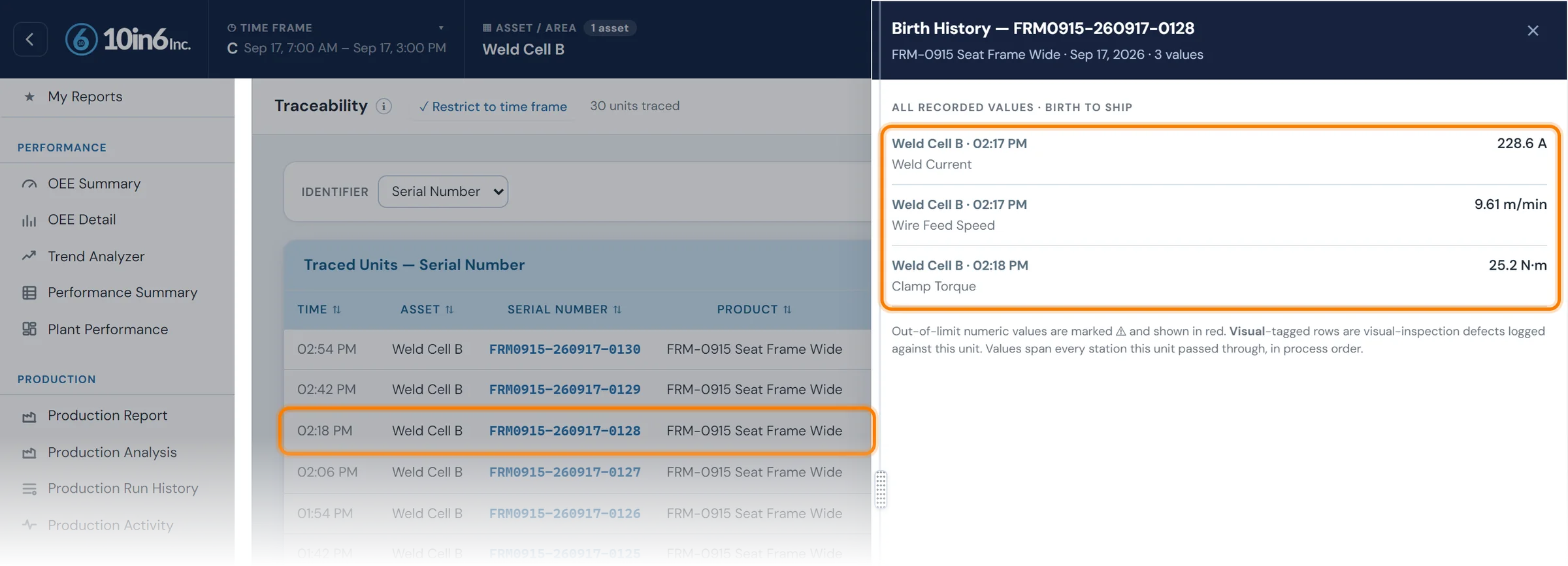
One serial number, four places to look
A customer asks for the history of one serial number. The assembly record is in one system, the test results in another, and the raw material lot in a receiving log. The process data was logged, but not against the part. Someone has to piece the answer together by hand, and the same happens for every audit question or recall.
The answer is slow, and when the pieces don't line up, nobody fully trusts it, even when the underlying data is good.
An identifier, and everything recorded against it
Each record starts with the identifier your plant already uses. Production data is filed against it as the part moves through the plant.
Your operation may track material and product by any of the following:
- Serial numbers
- Unit identifiers
- Batch numbers
- Lot numbers
- Temporary identifiers later married to permanent ones
As the product moves through the plant, the system can associate that identifier with:
- Process variables
- Inspection data and test results
- Machine data
- Raw material lots and sub-lots
- Changeover and validation records
- Quality check results
Most of it is captured without anyone typing: identifiers are scanned or read automatically at each station, and process values come straight from the machine as the part is made. Checks and inspections add their results as they are completed, so each birth history covers both the product and the process that made it.
What you can trace
Product identifiers
Trace by serial number, unit, batch or lot, whichever your operation uses for material and finished goods.
Temporary to permanent identifier marriage
An item that starts with a temporary ID keeps its history when it receives its permanent identifier later in the process.
Raw material and component history
Associate finished parts or batches back to the raw material lots or sub-lots that fed them.
Critical process parameters
Record process variables such as temperature, pressure, torque and fixture state against each part, along with any other characteristic that matters for quality or compliance.
Inspection and test results
Quality checks, inspection outcomes and product-specific test results go into the same record, so the history shows whether each unit passed its required checks.
Operation-by-operation history
See the path a part or batch took through the plant and the production conditions recorded along the way.
Birth history search
Enter a serial number, batch, lot or other identifying characteristic, and the birth history view returns that item's full production journey: each station it passed, the conditions recorded there and the result of every check.
Lot or serial, forward or backward
| Lot traceability | Serial traceability | |
|---|---|---|
| One record per | Batch or lot | Individual unit |
| Typical fit | High volume, lower-value parts; process industries | Automotive, safety-critical and high-value parts; customer-mandated |
| Containment scope | Every unit in the lot | Only the units that ran under the bad condition |
| Effort | Lower: record the lot at each step | Higher: scan or mark every unit, often with temporary IDs married later |
A worked investigation
- A customer reports three leaking pumps and sends the serial numbers.
- Trace backward: the birth histories show all three were pressure-tested on the same tester during one afternoon, and two were just inside the test limit.
- Trace forward: list every serial tested on that station in that window: a few hundred units, not the whole month's production.
- Contain and decide: hold or retest those units only, and check whether the cause was the process or handling after shipment.
What to record at each step
- The identifier (serial, lot or batch) and the time
- The station or machine
- Material lots consumed
- Key process results for that unit or batch
- Inspection and test results
- Disposition: passed, reworked, scrapped, held
Capture it as the part is made, by scan or automatic read. Traceability rebuilt from paper after a complaint is slow and incomplete.
Modules that add to the birth history
Track & Trace questions
- What is the difference between forward and backward traceability?
- Backward traceability starts from a finished part or complaint and works back to its inputs: which material lots, machines, operators, settings and test results went into it. Forward traceability starts from an input, such as a suspect material lot or a machine that was out of adjustment, and finds every finished unit it went into. A real investigation usually needs both: backward to find the cause, forward to find everything else it affected.
- Should we use lot traceability or serial traceability?
- Lot traceability records one history per batch; serial traceability records one per unit. Lot is simpler and suits high-volume, low-value parts and process industries. Serial is required where customers demand unit-level history, common in automotive and safety parts, and it makes containment far smaller. A common setup mixes the two: serialized finished units that record the material lots they consumed.
- How do you set up a track and trace process in manufacturing?
- Decide the level (lot, serial or both), then define what gets recorded at each step: the identifier, time, station, material lots consumed, key process results, inspection or test results, and the disposition. Capture it at the point of production by scanning or automatic reads, not afterwards from paper. Then test it: pick a finished unit and see how long a full birth history takes to pull, and pick a material lot and see whether you can list every unit it went into.
- What identifiers can 10in6 Track & Trace use?
- 10in6 can support serial numbers, unit identifiers, batch numbers, lot numbers, and other identifying characteristics depending on how the operation is configured.
- Can it track both product and process traceability?
- Yes. The system can connect product identifiers to process variables, inspection results, test outcomes, raw material lots, and other production records.
- What is a birth history search?
- A birth history search allows a user to enter a serial number, lot, batch, or other identifier and retrieve the full production journey associated with that item.
- Can we trace raw material lots into finished product?
- Yes. Raw material lots and sub-lots can be associated with finished parts or batches so the team can trace backward and forward more effectively.
- Can Track & Trace support temporary identifiers?
- Yes. It can support temporary identifiers and the later marriage of those identifiers to permanent ones.
- How does this help with recalls or customer issues?
- It helps narrow the scope of the issue by allowing teams to isolate material based on shared identifiers, lots, shifts, runs, process flow, or critical recorded parameters.
Set up around how your plant runs
Standardized platforms expect the plant to change to fit the software. Do-it-yourself platforms leave your team to build and maintain everything. With 10in6, we configure the system around your equipment, codes and reports, and your team runs it day to day.
Your equipment, codes and reports
Your checks, intervals and forms set up per line and product, and traceability built around your part numbers and your customers’ requirements.
Your team runs it day to day
Operators, downtime and scrap codes, products and targets, shift schedules, checks, alerts, emailed reports and real-time boards are managed by your own people. Everyday changes need no support ticket and no invoice.
A project manager for the bigger things
New machines, new modules and custom reports go through a 10in6 project manager who already knows your deployment, so nothing starts from scratch. If you would rather we made everyday changes too, we can.
Still here years later
The system keeps being refined after go-live, and new capabilities are added without rebuilding it. Some of our customer relationships have run for 12 years, and 97% of customers say they would never go back.
“Our 10in6 Project Manager has been very responsive and the software is flexible enough to be configured to our specific needs.”
How the 10in6 delivery model works →
How fast can you answer a customer concern today?
Tell us what you need to trace and what your customers ask for. We'll show you how a birth history would be set up around your part numbers and stations.
Free 30–60 minute call with one of our engineers.