
See Which Station Is Limiting Your Line
Find the operations that limit throughput, tell a station causing lost flow from one reacting to it, and put improvement effort where it moves output most.
10in6 reads machine states across the line and shows, station by station, how each one affects the ones around it.
A stopped machine is often waiting on another one
The date stamper has been stopped for 47 minutes, and nothing is wrong with it. The stations after it are backed up, so it is blocked. Further up the line, the laser cell is starved because parts aren't arriving. Other stations sit waiting on a feeder, a robot or a chute outside the machine itself.
Count every stopped machine as downtime and the date stamper looks like one of the worst stations on the line, although most of its lost time is a reaction to something else. Meanwhile the station that limits output may stop for a minute or two, over and over, and those stops get buried in broad downtime categories.
Raising throughput starts with knowing which operations limit the line, how often, and under what condition.
Machine states, read in the context of the line
Machine and line states are captured automatically
10in6 collects running states directly from connected machines, PLCs and line signals across the operation, and tracks how the stations interact as it happens instead of treating each machine on its own.
From those signals it can tell whether a machine is running, blocked, starved, overcycling or held up by a condition elsewhere in the process.
Stops are interpreted in line context
10in6 checks the line conditions around each stop to separate a station that is causing lost flow from one hit by a problem upstream or downstream.
In assembly and multi-step production, where one stop can idle several stations, that separation is what tells the constraint apart from its knock-on effects.
The line is shown visually
The module draws the process flow and marks each operation with colour, numbers and its live state.
Healthy stations, affected stations and the ones that keep limiting output can be picked out at a glance, without reading raw event tables or long reports.
Constraint patterns build over time
Over weeks, the event history shows the chronic constraints on the line. Alongside the live view, the history can be filtered by timeframe, shift, product and more, to see where the same limits keep showing up when improvement work is being planned.
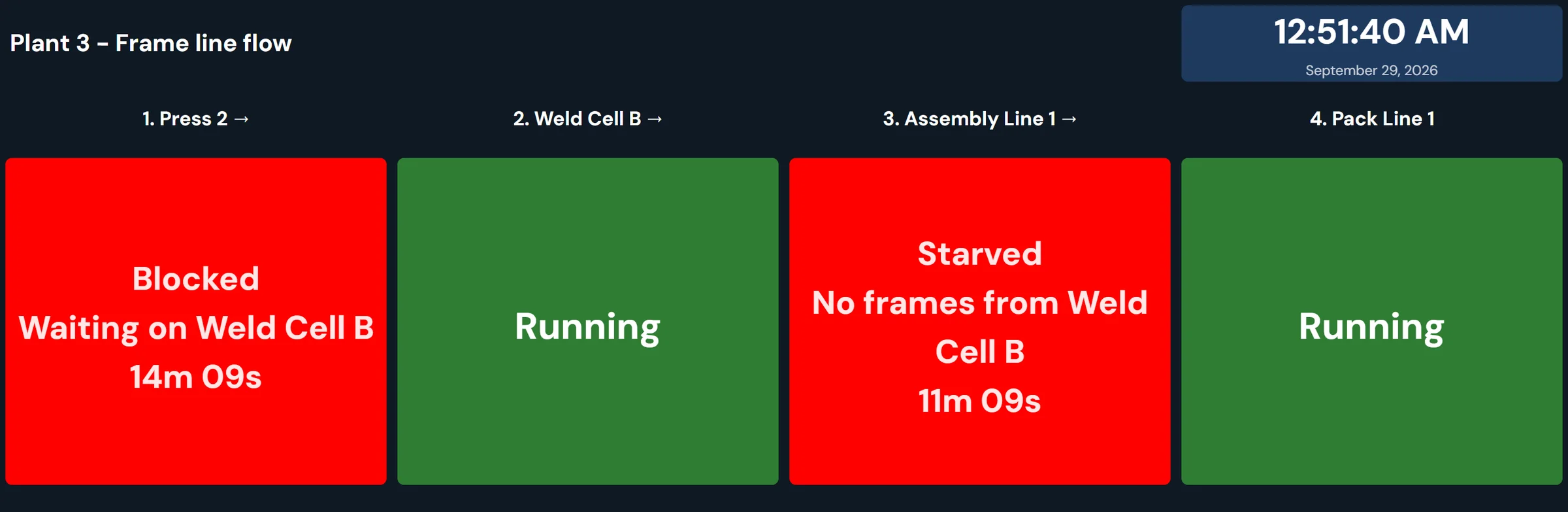
What the line view and the constraint reports show
- Where chronic constraints are located in the line
- Which stations are most frequently limiting throughput
- Whether a machine is blocked, starved, cycling, overcycling, or waiting
- How long each station has been in its current state
- How station impact changes over time
- Live constraint conditions across the process
- Historical constraint reports by timeframe, shift, product, and more
- Which operations deserve attention first
Fixing a starved station doesn't raise output
Speed up a machine that spends its shift waiting on another one and the line makes the same number of parts, because the station setting the pace hasn't changed. Line context shows engineers which station that is before the improvement budget is spent.
Modules that use the same line data
Constraint Analysis questions
- What is the difference between downtime and a constraint?
- Downtime tells you that a machine stopped. A constraint is the point where production flow is being limited. On a connected line, those are not always the same machine: a stopped station is often blocked or starved by another one.
- Can 10in6 identify whether a machine is blocked or starved?
- Yes. In many environments, 10in6 can use connected machine and line signals to identify conditions such as blocked, starved, cycling, and overcycling.
- Is this only for live monitoring?
- No. The module supports both live visibility and historical reporting so teams can analyze chronic constraints across shifts and time periods.
- Can reports be filtered by timeframe or product?
- Yes. Reports can be reviewed by timeframe, shift, part number, product, and other relevant filters depending on the deployment.
- Does Constraint Analysis replace Downtime Tracking?
- No. It adds line context to Downtime Tracking. Downtime Tracking records which machines stopped, for how long and why; Constraint Analysis shows how each of those stops affected flow through the whole line.
- Can the visual be adapted to our process layout?
- Yes. The visual representation can be tailored to reflect the structure of your line and the stations that matter in your operation.
Set up around how your plant runs
Standardized platforms expect the plant to change to fit the software. Do-it-yourself platforms leave your team to build and maintain everything. With 10in6, we configure the system around your equipment, codes and reports, and your team runs it day to day.
Your equipment, codes and reports
OEE calculated from your own machine signals, using your expected rates and your rules for planned stops.
Your team runs it day to day
Operators, downtime and scrap codes, products and targets, shift schedules, checks, alerts, emailed reports and real-time boards are managed by your own people. Everyday changes need no support ticket and no invoice.
A project manager for the bigger things
New machines, new modules and custom reports go through a 10in6 project manager who already knows your deployment, so nothing starts from scratch. If you would rather we made everyday changes too, we can.
Still here years later
The system keeps being refined after go-live, and new capabilities are added without rebuilding it. Some of our customer relationships have run for 12 years, and 97% of customers say they would never go back.
“Our 10in6 Project Manager has been very responsive and the software is flexible enough to be configured to our specific needs.”
How the 10in6 delivery model works →
Find the station that sets your line's output.
Tell us about the line that can't keep up. We'll show you how its stations interact, which one limits output, and what it's losing.
Free 30–60 minute call with one of our engineers.