
Get a Technician to the Stopped Machine Faster
Operators call maintenance with one button, the call goes to the technician or crew that covers that machine, and every response is timed from trigger to close.
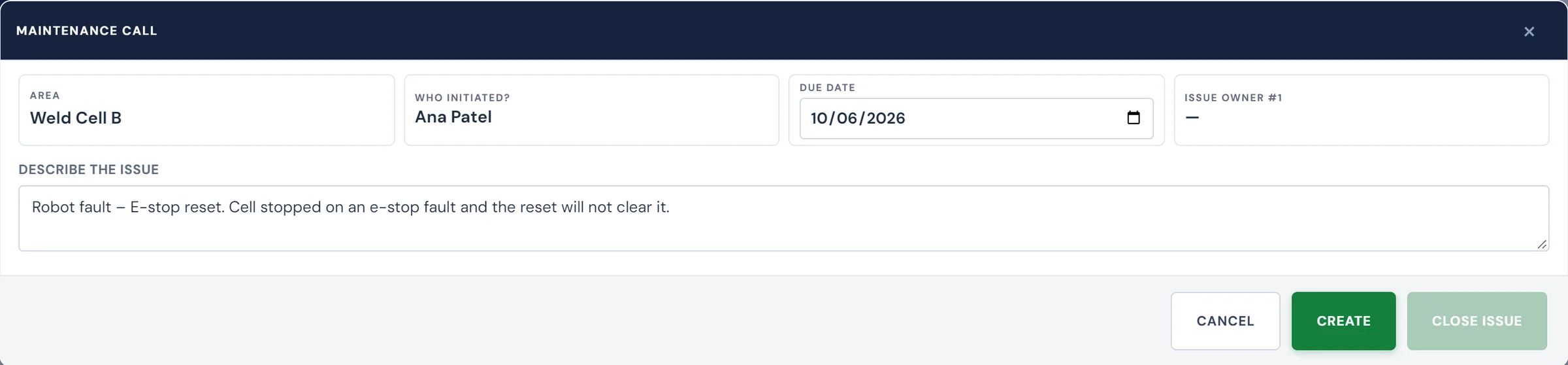

Often the longest part of a maintenance stop is the wait before a technician arrives.
Press B starts leaking on the return stroke. The operator radios for maintenance, walks off to find the supervisor, or texts whoever is on call. Someone gets there eventually, but nothing records when the leak was first spotted, how long the response took or what fixed it, and a call made on a busy radio channel can be missed altogether.
Every call is timed from the button press to the fix
Trigger the call from the floor
The operator presses one button at the station for an equipment, repair or safety problem. Nobody has to leave the line to go looking for a technician.
Send it to whoever covers that area
Routing is set by call type or area, to a named technician or a maintenance group. Andon boards around the plant show each open call and whether anyone has responded yet.
Track the response through resolution
The call keeps the name of the technician who picked it up, how long the response took and when the machine was running again. If the repair needs follow-up, the call can open a work order on its own, so the job lands in the machine's history.
What a maintenance supervisor can pull up
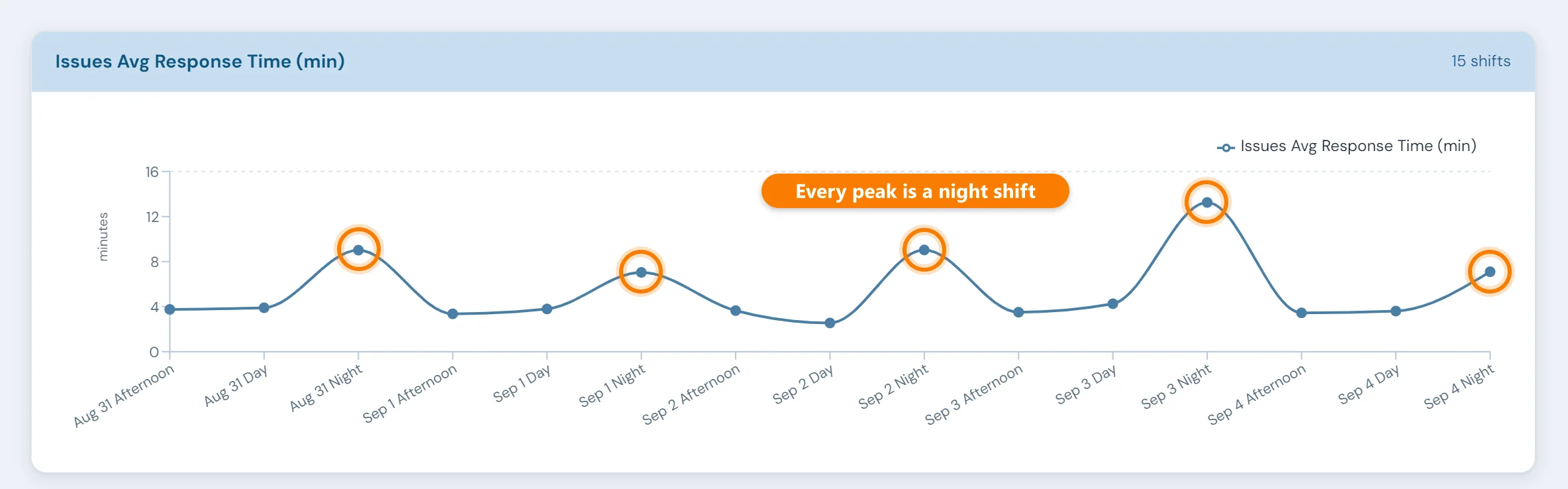
Every call adds to the record. From it, a maintenance supervisor can see:
- Open maintenance calls in real time
- Which technician or team was notified
- Response status across the facility
- Response and resolution time by call
- Maintenance activity history by technician or issue
- A full audit trail of every call, response, and resolution
Reading the response data
Group call times by shift, area and call type, and slow responses tend to cluster: one shift short on coverage, or one call type nobody owns. The same records show which machines call for maintenance most often, a starting list for recurring equipment problems.
Where a maintenance call connects
Maintenance Andon Calls — FAQ
- What types of issues can be called in?
- Maintenance Andon Calls can be configured for any equipment or repair issue your floor needs to escalate: machine faults, hydraulic problems, safety concerns, tooling problems and others. You set up the call types to match your operation.
- How are maintenance teams notified when a call is triggered?
- Depending on your deployment, notifications can be shown on real-time Andon boards, sent by email or SMS, or displayed on facility-wide display screens. Calls can be routed to specific technicians or maintenance groups.
- Does the system track who responded?
- Yes. Every call records who responded, when they acknowledged it, and when it was resolved. Response time and resolution time are tracked per call and available in reporting.
- Can a call automatically create a work order?
- Yes. When the CMMS Work Orders module is deployed, a maintenance Andon call can automatically generate a work order, pre-populated with the call details, area, and issue type. The technician can then log their work against that order.
- Can we see response time performance over time?
- Yes. Historical data from every call is available for reporting. You can review average response times by area, technician, call type or time period, and see whether they are improving.
- How does this differ from the MES Andon Calls feature?
- MES Andon Calls is a broader escalation tool that covers maintenance, quality, material handling, team leaders, and more. Maintenance Andon Calls is focused on equipment and repair issues, and adds the deeper CMMS integration, including automatic work order creation and technician tracking.
Set up around how your plant runs
Standardized platforms expect the plant to change to fit the software. Do-it-yourself platforms leave your team to build and maintain everything. With 10in6, we configure the system around your equipment, codes and reports, and your team runs it day to day.
Your equipment, codes and reports
Andon calls routed by call type to the technicians on your crew, following the escalation each shift uses.
Your team runs it day to day
Operators, downtime and scrap codes, products and targets, shift schedules, checks, alerts, emailed reports and real-time boards are managed by your own people. Everyday changes need no support ticket and no invoice.
A project manager for the bigger things
New machines, new modules and custom reports go through a 10in6 project manager who already knows your deployment, so nothing starts from scratch. If you would rather we made everyday changes too, we can.
Still here years later
The system keeps being refined after go-live, and new capabilities are added without rebuilding it. Some of our customer relationships have run for 12 years, and 97% of customers say they would never go back.
“[Our 10in6 project manager] has been great to work with. He is very responsive, quick to help and provides solutions, whether we have random questions, new requirements or the rare times we have system issues.”
How the 10in6 delivery model works →
Time your next maintenance call from trigger to fix
Tell us how operators reach maintenance today and who covers which machines. We'll work out how calls would be routed on your floor.