
Find the Operations Pulling First-Pass Quality Down
A scrap total shows how many parts were lost. First Time Through shows which line, shift, product or operation lost them.
10in6 First Time Through measures the share of units that pass every step without rework, repair or rejection, calculated from the quality checks and scrap your team already records.
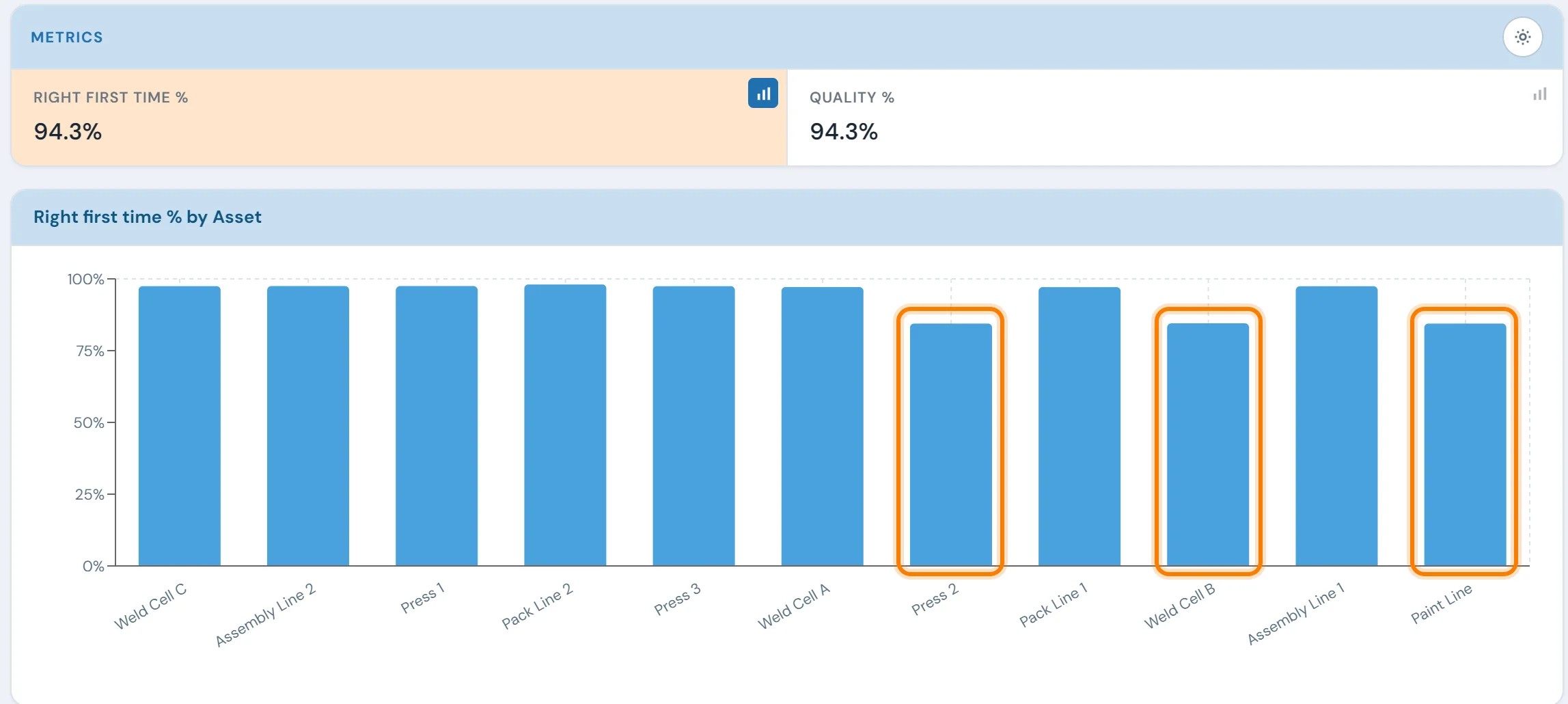
Why first-pass loss is hard to see
Scrap and rework usually get recorded somewhere: a scrap log, rework tags, the check sheets. They rarely get put together by operation, so nobody can say where first-pass loss starts or whether it's shrinking.
Rework happens, but the pattern isn't visible
Quality teams know which defects exist but can't easily see which line, shift, product or operation produces the most first-pass loss, so improvement effort gets spread thin.
FTT is a monthly spreadsheet
Where FTT is calculated at all, it's usually done by hand once a month. By the time the number is ready, the shift that caused the loss is weeks back.
Effort goes to the loudest defect
Without a breakdown by operation, teams chase the defect people are talking about, while the operation generating the most rework goes unnoticed.
Built from the checks and scrap your team already records
FTT comes from two things your team already records in the Digital Quality System: check outcomes and scrap events. It updates as each result comes in, with no extra data entry.
Pass and fail results are recorded at the station when they happen, so FTT reflects the actual outcomes rather than a shift-end recollection. It is reported by product, line, shift and quality gate, which shows quality managers where in the route units most often fail the first time.
A plant-wide FTT of 94% says little on its own. Broken down by operation, it points to the station where most of the rework starts.
What you can track and act on
Automatic FTT calculation
FTT recalculates as check outcomes and scrap records arrive, so the number on screen is current to the last recorded result.
Multi-dimensional breakdown
Break FTT down by line, shift, product family or part number, down to a single operator or operation.
Operation-level visibility
Identify which operations, quality gates or check types drive the most rework and first-pass failures.
Historical trends
Track first-pass performance over shifts, weeks, and months. Know whether changes to process, staffing, or equipment are having the intended effect.
OEE Quality Rate connection
First-pass losses are the Quality Rate side of OEE. With OEE Tracking also running, both numbers come from the same records.
Evidence for CI projects
Before-and-after FTT for the operations a project touched, ready for the project review.
- Scrap and rework tallied at the end of the month
- FTT worked out by hand, if at all
- No way to tell which operation drives the repeat failures
- Priorities set by whichever defect people complain about
- FTT updated from each check and scrap entry
- FTT by line, shift, product and operation
- The worst operation visible on the report
- Priorities set by measured first-pass loss
Modules that feed FTT or use it
First Time Through questions
- What is FTT (First Time Through) in manufacturing?
- FTT stands for First Time Through. It is the percentage of units that complete every required production and quality step without rework, repair, re-test or scrap on the first attempt. A unit that shipped but needed a touch-up along the way does not count toward FTT. That makes it stricter than a simple pass/fail yield, and a better measure of whether the process is capable.
- How do you calculate First Time Through?
- The standard calculation is: FTT = (Units Entering the Process − Scrapped − Reworked − Repaired − Re-tested) ÷ Units Entering the Process. Worked example: 1,000 units enter a line, 20 are scrapped, 35 are reworked and 10 are repaired. FTT = (1,000 − 20 − 35 − 10) ÷ 1,000 = 935 ÷ 1,000 = 93.5%. Across a multi-operation route, plant-level FTT is the product of the individual operation rates (FTT₁ × FTT₂ × … × FTTₙ), not their average. A route of five operations each running 98% therefore yields roughly 90% overall, and averaging the station numbers flatters the real figure.
- What is the difference between FTT and first pass yield?
- The two are often used interchangeably, and usage varies by plant and industry. Where a distinction is drawn, First Pass Yield is usually measured at a single operation, while First Time Through is the rolled measure across the entire route. FTT is also stricter, excluding any unit that needed rework or repair even if it eventually passed. In automotive quality programs FTT is typically the whole-route figure reported to the customer. Agree on which definition your plant uses and apply it consistently; comparing your FTT against a supplier's first pass yield compares two different things.
- How does 10in6 calculate FTT automatically?
- 10in6 builds FTT from the quality check outcomes and scrap events your team already records. FTT recalculates as each inspection result and scrap entry comes in, so there is no spreadsheet to maintain.
- Can FTT be broken down by line, shift, product, or operation?
- Yes. FTT can be viewed by production line, shift, product family, part number, operator or individual operation, to find where first-pass loss is concentrated.
- How does First Time Through connect to OEE?
- FTT feeds directly into the Quality Rate component of OEE. If you run OEE Tracking in 10in6 MES, first-pass losses recorded in DQS count against Quality Rate automatically, with no reconciliation between the two systems.
- What is a realistic FTT target?
- FTT benchmarks vary significantly by industry and process type. High-volume automotive plants often target 95%+ FTT at individual operations. Your own trend is more useful than a benchmark: whether the rate is improving, holding or slipping, and which operations drive the loss.
Set up around how your plant runs
Standardized platforms expect the plant to change to fit the software. Do-it-yourself platforms leave your team to build and maintain everything. With 10in6, we configure the system around your equipment, codes and reports, and your team runs it day to day.
Your equipment, codes and reports
Your checks, intervals and forms set up per line and product, and traceability built around your part numbers and your customers’ requirements.
Your team runs it day to day
Operators, downtime and scrap codes, products and targets, shift schedules, checks, alerts, emailed reports and real-time boards are managed by your own people. Everyday changes need no support ticket and no invoice.
A project manager for the bigger things
New machines, new modules and custom reports go through a 10in6 project manager who already knows your deployment, so nothing starts from scratch. If you would rather we made everyday changes too, we can.
Still here years later
The system keeps being refined after go-live, and new capabilities are added without rebuilding it. Some of our customer relationships have run for 12 years, and 97% of customers say they would never go back.
“Our 10in6 Project Manager has been very responsive and the software is flexible enough to be configured to our specific needs.”
How the 10in6 delivery model works →
See how much of your output is made right first time.
Tell us where parts fall out today. We'll show you FTT by line, product and operation, and the checks and inspections that raise it.
Free 30–60 minute call with one of our engineers.