
Go Paperless and Make Sure Critical Checks Happen On Time
The hourly in-process check, the first-off after a changeover, the start-of-shift checklist: each one comes up on the operator screen when it's due, and a late or missed check shows up right away.
10in6 Scheduled Checks replaces the paper forms with a touch-screen workflow at the line that records every result with the time and the operator, ready to search and report on.
The 10:00 check gets written in at 11:30
On a paper form, a late check looks the same as an on-time one. Critical checks live on clipboards and in routines that depend on someone remembering, so they get missed, filled in after the fact, signed off too easily, or filed where nobody can find them when a customer, supervisor or auditor asks.
The process can drift with nobody catching it in time, and when someone needs proof of what happened, the paperwork can't provide it.
From the schedule to the recorded result
You define each check and what brings it up: a time, the start of a shift, a changeover, or another event on the line.
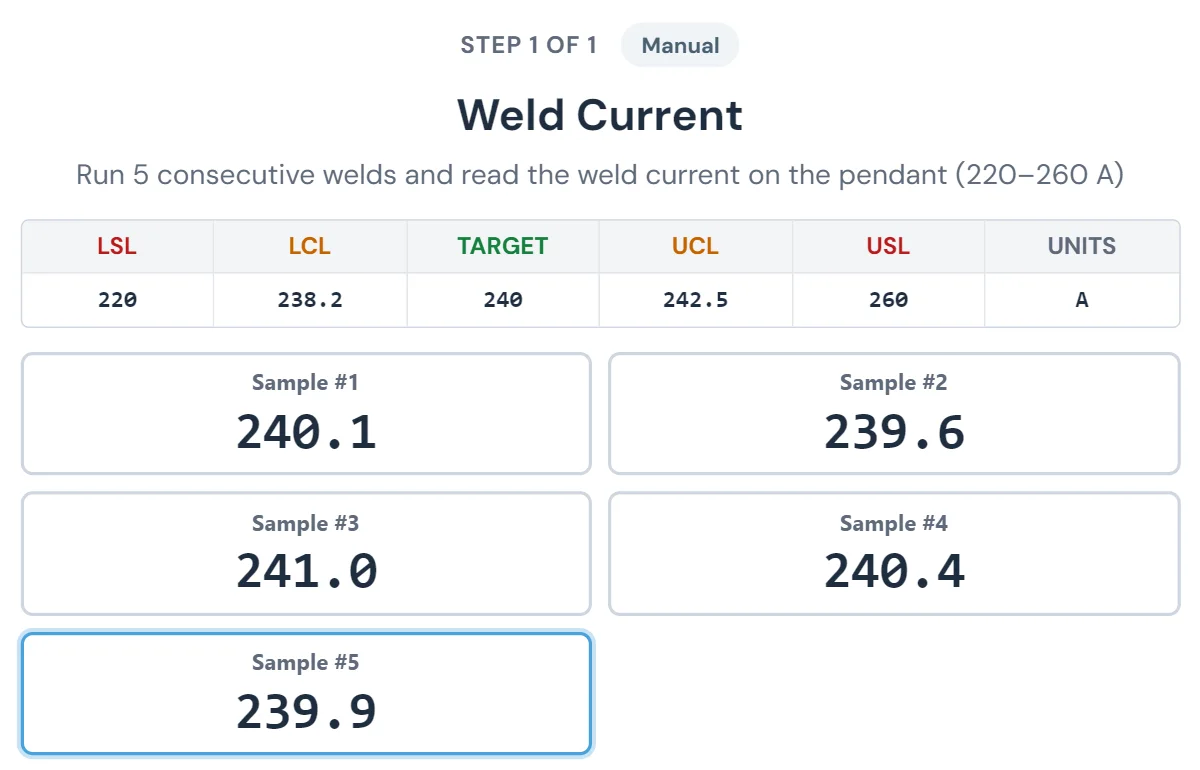
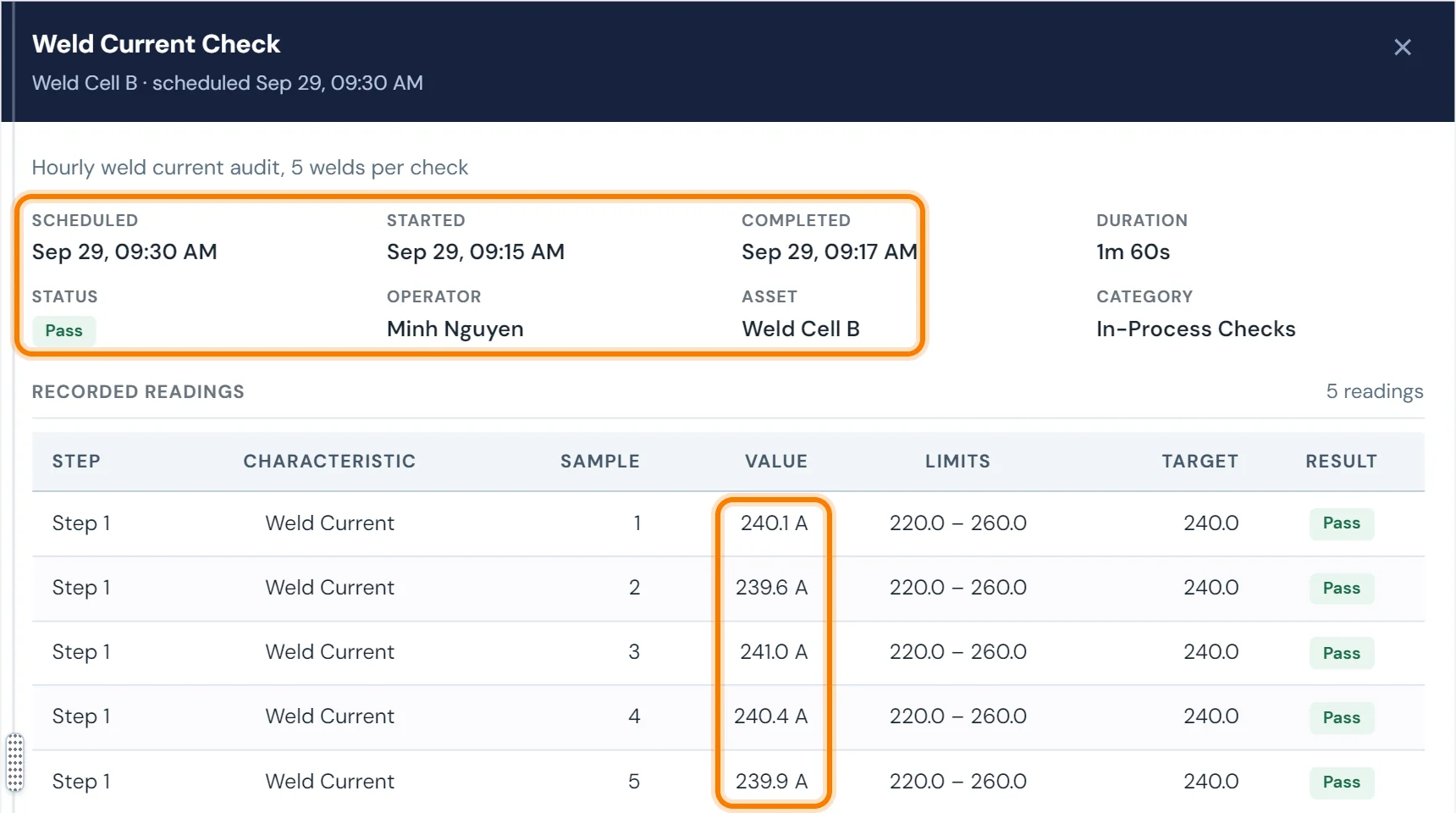
The operator completes the check on a touch screen at the line, with work instructions shown step by step. 10in6 records the entry, when the check was due and when it was done, and whether each reading was within specification.
A check due at 10:00 and done at 11:30 is recorded at 11:30 and shows as late.
What you can manage
Electronically triggered check intervals
Each check comes due from the schedule or workflow rule you set, which cuts down on late entries and on checks filled in after the fact.
Time-limited completion and data entry
Give each check a window for completion and data entry, so it gets done close to the time it was due.
Real-time alerts and notifications
Missed, late and out-of-spec checks show on screen as they happen and, depending on configuration, go by email or text to the supervisor or quality tech you choose.
Touch-screen entry with in-context instructions
Operators enter a number, text or a button press, with the instruction for that step shown beside it instead of in a binder.
Multi-step checks
A check can have several inputs or confirmations, presented to the operator in order.
Up-to-date specs and instructions
When a specification or work instruction changes, the check shows the current version, and old printouts stop being the reference.
Plant-wide scorecard visibility
A scorecard shows each line, area and machine against its check-completion target, so follow-up goes to the ones falling behind.
Check history that works as audit evidence
Every completed check is stored permanently and can be searched. When an auditor or customer asks for documentation, the team looks it up.
The record for each check includes:
- Time-stamped completion: when the check ran
- Result: what was entered and whether it was in spec
- Operator identity: who completed it
- Exception record: whether the check was missed, late or out of spec
Filter the history by line, shift, part number, area or date range. It matters most where audits test process discipline, as in automotive and food and beverage.
Where check results end up
Scheduled Checks questions
- What kinds of checks can be digitized in 10in6?
- Scheduled Checks can handle start-of-shift checks, hourly in-process checks, changeover validation, TPM checks, preventative maintenance, 5S tasks and other recurring quality or process checks.
- Can checks be triggered automatically?
- Yes. Checks can be electronically triggered based on the schedule or workflow rules you define.
- Can the system show missed, late, or out-of-spec checks?
- Yes. One of the main benefits is making exceptions visible in real time so the team can respond quickly.
- What kind of results can users enter?
- The interface can support numeric, alphanumeric, and push-button style inputs, including multi-step checks where more than one result or confirmation is required.
- Can work instructions be shown with the check?
- Yes. Scheduled Checks can display in-context work instructions and up-to-date specifications as part of the workflow.
- How does this help with audits?
- The system provides a searchable, date-and-time-stamped history of completed checks and results, which makes it much easier to retrieve records during customer or regulatory audits.
Set up around how your plant runs
Standardized platforms expect the plant to change to fit the software. Do-it-yourself platforms leave your team to build and maintain everything. With 10in6, we configure the system around your equipment, codes and reports, and your team runs it day to day.
Your equipment, codes and reports
Your checks, intervals and forms set up per line and product, and traceability built around your part numbers and your customers’ requirements.
Your team runs it day to day
Operators, downtime and scrap codes, products and targets, shift schedules, checks, alerts, emailed reports and real-time boards are managed by your own people. Everyday changes need no support ticket and no invoice.
A project manager for the bigger things
New machines, new modules and custom reports go through a 10in6 project manager who already knows your deployment, so nothing starts from scratch. If you would rather we made everyday changes too, we can.
Still here years later
The system keeps being refined after go-live, and new capabilities are added without rebuilding it. Some of our customer relationships have run for 12 years, and 97% of customers say they would never go back.
“Our 10in6 Project Manager has been very responsive and the software is flexible enough to be configured to our specific needs.”
How the 10in6 delivery model works →
Take the check sheets off the clipboard.
Tell us which checks your lines run today, and we'll show you how they would run on screen, with the record behind each one.