
Capture the Process Data Behind Quality and Performance
Collect PLC and sensor values on the conditions you define, track them over time, and use that data for trends, alerts, and process monitoring.
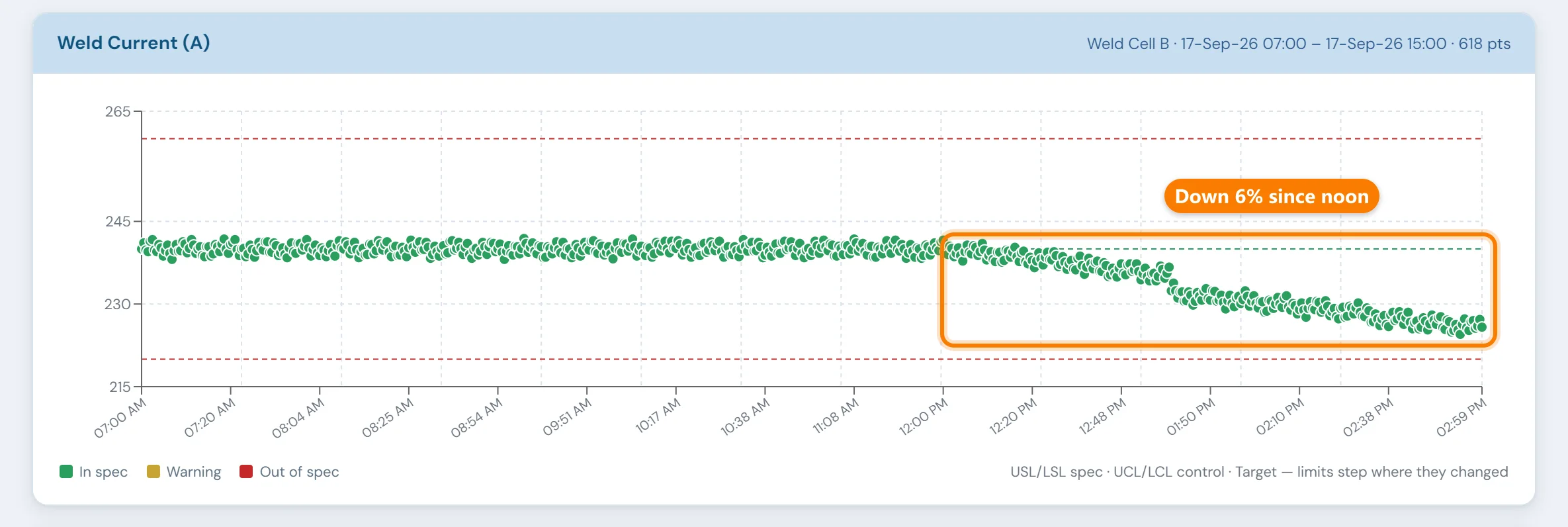
The PLC shows this cycle's weld current and keeps no history of it.
The machine reads temperature, pressure, speed and cycle time on every cycle. Unless something captures and stores those values, each one is gone when the next cycle starts.
A slow drift like the one above then goes unnoticed while it is still inside the limits. When a quality issue turns up later, nobody can say what the process was doing during that run.
From signal to searchable history.
Connect to the signals that matter
10in6 connects to PLC and sensor outputs — temperature, pressure, speed, level, position, or any value your process exposes — without requiring modifications to existing control logic.
Set when and how values are collected
Collection rules are set per value in the 10in6 interface, with no custom programming. A furnace temperature might be logged every minute, a setpoint only when someone changes it, and a pressure whenever it crosses a threshold.
View trends and catch drift early
Collected values are stored and drawn as trend charts with upper and lower control limits, so a gradual drift shows up before it becomes a quality or performance problem.
Trigger alerts when limits are crossed
When a variable moves outside its defined range, an alert can notify operators and engineers straight away, while there is still time to respond before output suffers.
Tie variable data to jobs and products
Each stored value can carry the job or product that was on the machine when it was recorded, so process behaviour can be compared run against run, or one product against another.
Any configured variable, over any time range
- A trend chart for any configured variable
- Historical values over any time range, with upper and lower limits on every chart
- Several variables compared across the same time window
Investigating a bad run
A quality investigation stalls when nobody recorded what the process was doing. With the values stored, engineers and quality teams can look back at the problem run, find the root cause sooner, stop it recurring, and back a proposed process change with data.
Modules that use process data
Process Variable Collection questions
- What is a process variable in manufacturing?
- A measurable condition of the process that affects the result, such as a temperature, pressure, speed, flow, level or position. Most are already measured by the machine's PLC or sensors; collecting them means storing those values over time so they can be trended, compared across runs and alarmed on.
- What types of signals can be collected?
- Any value available through the PLC or connected sensors — temperature, pressure, speed, cycle count, level, position, or other process values your operation monitors.
- How frequently can values be collected?
- Collection frequency is configurable. Values can be collected on a timed interval, on change, or when a value crosses a defined threshold.
- Can alerts be triggered when a variable goes outside normal range?
- Yes. Upper and lower limits can be defined for any variable, and alerts can be triggered when values move outside those boundaries.
- Can variable data be tied to specific jobs or products?
- Yes. Collected values can be associated with the job or product running at the time of collection, making it easier to investigate quality issues or compare process behavior across runs.
- Does this require custom programming to configure?
- No. Collection rules are configured through the 10in6 interface. Engineering or IT involvement is not required for routine configuration changes.
- Is this the same as SPC?
- Process Variable Collection is the data layer that SPC builds on. It handles signal capture and historical storage. SPC analysis — control charts, capability indices, and statistical alerts — is a separate module that uses that data.
Set up around how your plant runs
Standardized platforms expect the plant to change to fit the software. Do-it-yourself platforms leave your team to build and maintain everything. With 10in6, we configure the system around your equipment, codes and reports, and your team runs it day to day.
Your equipment, codes and reports
Your machines, your ERP, your part numbers, your shift structure and your reports.
Your team runs it day to day
Operators, downtime and scrap codes, products and targets, shift schedules, checks, alerts, emailed reports and real-time boards are managed by your own people. Everyday changes need no support ticket and no invoice.
A project manager for the bigger things
New machines, new modules and custom reports go through a 10in6 project manager who already knows your deployment, so nothing starts from scratch. If you would rather we made everyday changes too, we can.
Still here years later
The system keeps being refined after go-live, and new capabilities are added without rebuilding it. Some of our customer relationships have run for 12 years, and 97% of customers say they would never go back.
“Our 10in6 Project Manager has been very responsive and the software is flexible enough to be configured to our specific needs.”
How the 10in6 delivery model works →
Start keeping the values your PLCs already read.
Tell us which machines and signals matter most. We'll show you them trended, checked against limits and tied to the job that was running.