
Why Your Line Keeps Missing Its Production Target
Before you change the target, measure where each shift's time goes: stops, changeovers, slow cycles and scrap.
Where a shift's output goes
The line was scheduled for 900 parts and made 700. At the production meeting the gap turns into a debate: the machine was down, the material was late, the target was never realistic. Without a record of where each minute went, nobody can say which of those is right, so the target gets questioned instead of the losses.
When the target comes straight from the ideal cycle, it assumes the machine never stops, never waits for parts and never changes over, and that operators have nothing else to do during the shift: no quality checks and no cleanup. No line runs like that. The gap between that target and the count at the end of the shift is made of losses, and every one of them can be measured.
Sometimes the target is wrong as well. The sections below show how to tell the two apart.
A target set at the ideal cycle is a 100% OEE target
An eight-hour shift with 30 minutes of planned breaks leaves 450 minutes of production. At a 30-second ideal cycle, the target is 900 parts. Here is where one ordinary shift's output went.
| Loss | Time or rate | Parts lost |
|---|---|---|
| Changeover to the next product | 20 min | 40 |
| Quality checks at the machine | 10 min | 20 |
| Cleanup before the end of the shift | 10 min | 20 |
| Stops: a jam, waiting on material, a fault | 30 min | 60 |
| Cycle averaging 32 seconds against 30 | over 380 min of running | 48 |
| Scrap | 2% of parts made | 14 |
| Good parts made | against a target of 900 | 698 |
What the shift total says
698 against 900, or 78% of target. A miss of 202 parts, and a meeting spent arguing about why.
What the record says
Availability 84.4%, Performance 93.7%, Quality 98.0%, for an OEE of 77.6%. All 202 parts are accounted for, and the two biggest places to start are the 60 lost to stops and the 48 lost to slow cycles.
Reaching 900 would take a perfect shift: no changeover, no checks, no cleanup, no stops, no scrap, and every cycle at 30 seconds. Treat the target as the yardstick and the losses as the work. For where the often-quoted 85% OEE benchmark comes from, see the glossary.
Why lowering the target skews the data
After a few weeks of missing 900, the easy move is to set the target to 700. The next report shows the line on target. The 20-minute changeover, the jams and the two-second slow cycle are all still there; they have only dropped out of the report.
It also breaks every comparison. If the target was 900 in March and 700 in April, April's "on target" can't be compared with March's miss, and an improvement made in May is measured against a number that has already moved. Trimming the target for each loss, a few parts at a time, does the same thing more slowly.
Set the target from the ideal cycle and leave it. Then a shorter changeover or a fixed jam shows up as a smaller gap, and the change can be measured.
If the schedule needs a realistic number
Plan with an expected rate, such as the ideal rate multiplied by the OEE the line has been running at. Keep it separate from the target the line is measured against. Planning stays realistic and the losses stay on the report.
When the cycle time target is wrong
Some targets can't be reached in normal production because of how they were set. Engineers time a cycle during a run-at-rate or a trial, and the conditions that day don't match a normal shift.
- More operators than normal. The trial ran with an extra person loading or unloading, and a normal shift has one.
- A step bypassed. A check, a scan or a manual operation was skipped during the trial and is part of every cycle now.
- A change after the run-at-rate. The machine or the process was modified later, adding time to each cycle, and the target was never updated.
To check, compare the conditions of the original timing with a normal shift, and compare the target with the fastest rate the line has held on that product (see best rate vs target rate). If the line has never run at the target cycle, even during its best stretch, the target needs a second look. Correct it once, write down why, and hold it from then on.
This is the less common case. More often the target is right, and the line needs an honest OEE with every loss measured and given a reason.
“Being able to analyze cycle time losses was a big win for us. Before 10in6 we would have hours with no downtime, where we still didn’t hit our target. We have caught issues where 20 second cycles were taking 21 or 22 seconds, that we never would have seen without 10in6.”
Five questions to answer when a line misses its target
- Are the cycle times right? Check that each product's ideal cycle was set under normal conditions, and that products with different cycles aren't sharing one target. See OEE with mixed products.
- Is it the same target as last month? If it has moved, compare against the original before drawing any conclusions.
- Where did the time go? Split the gap into stops, changeovers, slow cycles and scrap, as in the worked example above.
- How much of the downtime has a reason? A stop with no reason can't be fixed. Rank the reasons by minutes lost, and check whether they cluster on particular products or shifts. See downtime reason codes.
- What is scrap costing? Find the scrap rate and its biggest cause. Every scrapped part also used machine time that counted against the target. See scrap tracking.
Then take the biggest loss, find its root cause (a five whys is often enough), fix it, and measure the result against the same target. If the gap is on the machine that sets the pace for the whole line, start with the constraint.
What plants gained by measuring every loss
How 10in6 shows where the output goes
Every stop, from the machine
Stops are detected from the machine signal, so a two-minute jam is recorded the same way as a two-hour breakdown. Downtime Tracking →
A reason at the line
Operators pick the reason at the Operator Console, from a short list set up for that machine, while the stop is still fresh.
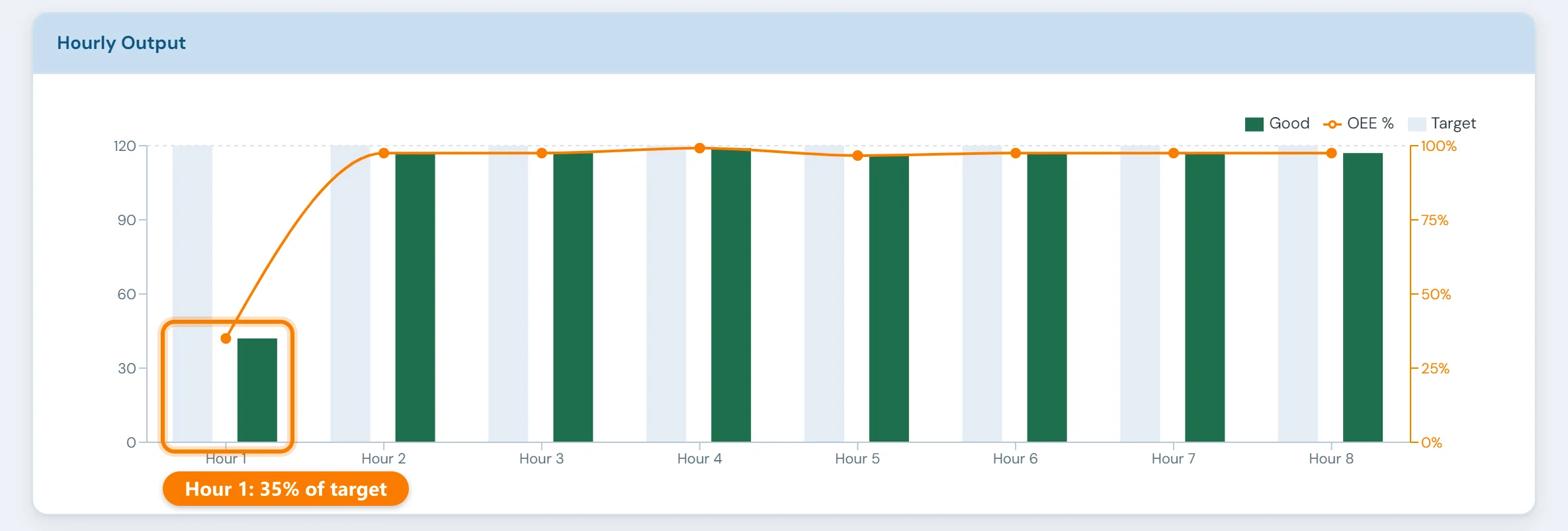
Each hour against target
The console and shop-floor boards show each hour's output against its target while the shift runs, so a bad hour gets attention before the shift is over. Real-Time Visibility →
Losses ranked
OEE by line and product, built from machine data, with downtime reasons ranked by minutes lost next to slow cycles and scrap. OEE Tracking →
Older machines can be part of it too. See how production data gets from a PLC into an MES, including machines with no network port.
Set up around how your plant runs
Standardized platforms expect the plant to change to fit the software. Do-it-yourself platforms leave your team to build and maintain everything. With 10in6, we configure the system around your equipment, codes and reports, and your team runs it day to day.
Your equipment, codes and reports
OEE calculated from your own machine signals, using your expected rates and your rules for planned stops.
Your team runs it day to day
Operators, downtime and scrap codes, products and targets, shift schedules, checks, alerts, emailed reports and real-time boards are managed by your own people. Everyday changes need no support ticket and no invoice.
A project manager for the bigger things
New machines, new modules and custom reports go through a 10in6 project manager who already knows your deployment, so nothing starts from scratch. If you would rather we made everyday changes too, we can.
Still here years later
The system keeps being refined after go-live, and new capabilities are added without rebuilding it. Some of our customer relationships have run for 12 years, and 97% of customers say they would never go back.
“Our 10in6 Project Manager has been very responsive and the software is flexible enough to be configured to our specific needs.”
How the 10in6 delivery model works →
Questions about production targets
- Why are we missing our production targets?
- Because the line is losing time and parts that nobody is measuring: stops, changeovers, quality checks, slow cycles and scrap. A target set from the ideal cycle time is a 100% OEE target, so some gap is expected. Keep the target fixed, measure every loss against it and work on the biggest first. Now and then the target itself was timed under conditions a normal shift doesn't have, and that is worth checking once.
- Is 100% OEE possible?
- No. 100% OEE means every planned minute ran at the ideal cycle time and every part was good: no stops, no changeovers, no quality checks or cleanup, and no waiting for material. A line measured against its ideal cycle will always fall short of it. The useful question is how big each loss is and which one to fix first.
- Should we lower production targets if the line never hits them?
- Not to make the report look better. Lowering the target hides the losses that caused the miss, and it makes this month impossible to compare with last month. Keep the target fixed and measure the losses against it. Change it only when the original timing doesn't match normal production, such as extra operators or a skipped step during the run-at-rate, and record why it changed.
- How do you know if a cycle time target is realistic?
- Compare the conditions when it was set with a normal shift: the number of operators, every step of the process, and any changes made to the machine since. Then compare the target with the best rate the line has sustained on that product. If the line has never reached the target cycle, even in its best stretch, the target needs review. If it has, the target is reachable and the gap is made of losses.
- How do you track output against target during a shift?
- Count parts from the machine and compare each hour with that hour's target, on a screen the operators and the supervisor can both see. A bad hour then gets attention while there is still time to recover. In 10in6, the Operator Console and shop-floor boards show hour-by-hour output against target, and the shift report is emailed when the shift ends.
Find out what your line loses each shift.
Tell us which line misses its target and how that target was set. We'll work out where the time is going and what it would take to measure it.
Free 30–60 minute call with one of our engineers.