
Short-Staffed Shifts: Who Can Cover When an Operator Calls Out
At 6:05 the supervisor knows who clocked in. Filling the open station takes knowing who is qualified to run it, who is free, and where everyone else is working right now.
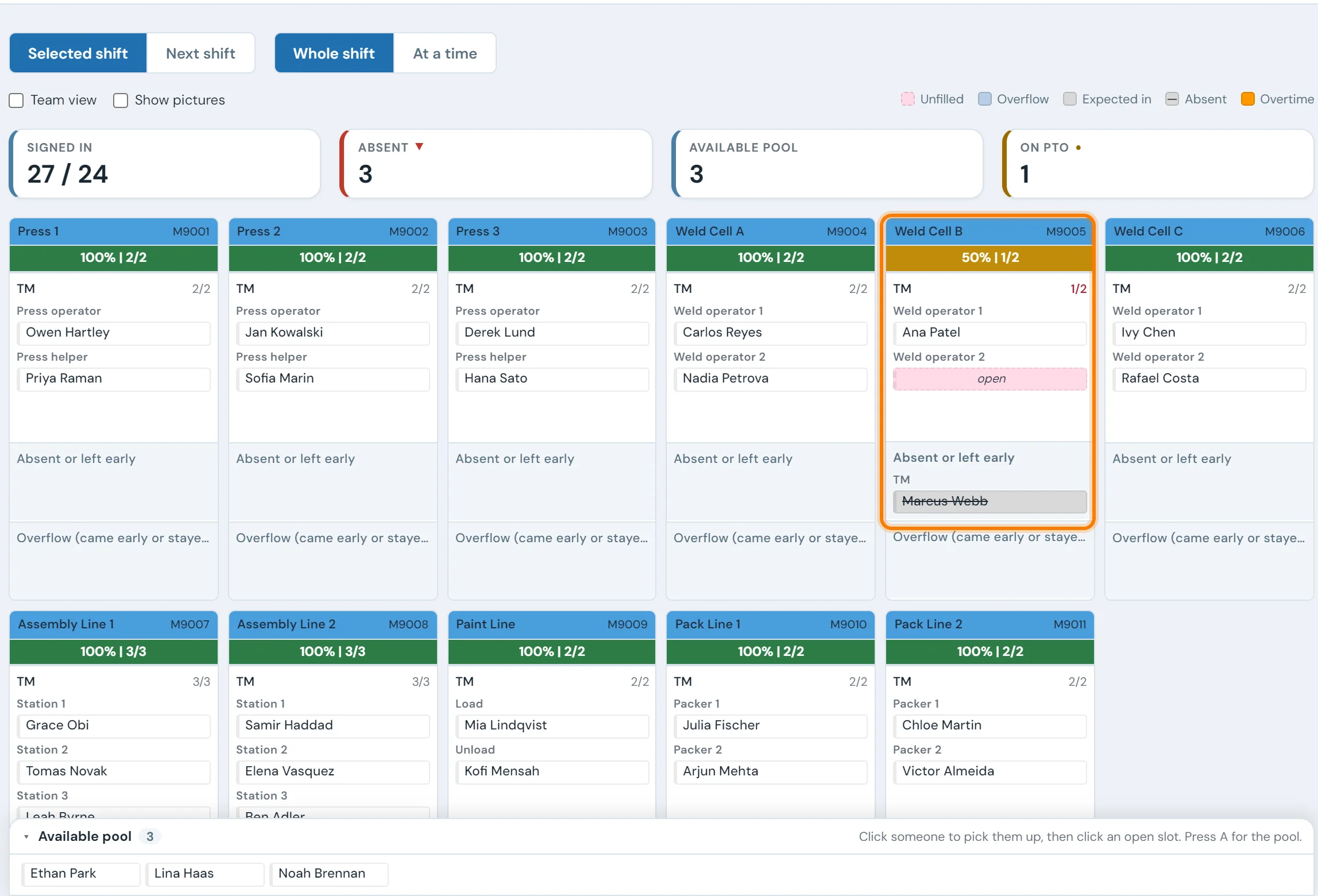
Where the time goes when someone doesn't show
The second weld operator on Weld Cell B hasn't badged in. The supervisor finds out when the cell runs slow, then walks the floor with a clipboard looking for someone who has run that cell before. The person they find is covering pack, so pack now runs short too.
None of this shows in the timekeeping system, which records punches for payroll. It can say that 27 people clocked in. It has no record of the station each one went to, the reassignments since, or who holds a weld cell certification, so the supervisor rebuilds that picture from memory every morning.
When the pick is made in a hurry, the station gets filled by someone who is available instead of someone who is qualified. That is when the first-off check gets missed or the scrap rate on that cell climbs for the rest of the shift.
Four things the supervisor needs before the line starts
A headcount answers none of these. Each one needs attendance joined to positions and to the skills record.
Which positions are open
By station, as people badge in. Weld Cell B at one of two operators is a different problem from a full line with one extra absence in the office.
Who is here without a station
People who are signed in but not yet assigned, kept apart from those on PTO, on another shift, absent or on light duty.
Who is qualified on the open one
Certified, in training or expired, for that station. A certification that lapsed last week should show before the person is moved.
What moving them leaves open
Where the candidate is working now, so filling the weld cell doesn't quietly empty the pack station.
Find the stations only one person can run
A call-out stops the line when it lands on a station with too few qualified people. A widely used cross-training rule is three per position, enough to cover one absence and one vacation on the same day. Line totals hide the shortfall: a line with forty trained operators can still have a leak tester that two people can run.
- Count qualified people by station, not by line. List every position with its certified and in-training operators across all shifts.
- Mark the single points of failure. Any station with one qualified person goes to the top of the training list, ahead of stations that already have seven.
- Train where the call-outs land. Check which stations were left open most often in the last quarter, and put training hours there first.
- Keep certifications current. Flag refreshers before they expire, so a qualified operator doesn't become an unqualified one on the day they are needed.
- Put temps on the matrix from day one. Agency staff often start before HR has them in the system. Recording their training from the first shift makes them part of the coverage.
For what to do before an experienced operator retires, see when your best operator retires.
“The Scan to Pack functionality has also greatly reduced training time for the final pack operation. Almost anyone can jump into the role because they no longer have to memorize the bill of materials for each model, it’s right there in front of them.”
Attendance, positions and skills on one board
Punches from your timekeeping
Employees and punches sync from ADP, UKG/Kronos, Attendance on Demand and other systems. Payroll and time off stay where they are.
A live board by position
Each badge-in signs the operator into their assigned station, and everyone else sorts into available, PTO, off-shift, absent and light duty, on a TV, a laptop or a phone.
Who can cover, at the call-out
The skills matrix shows certified, training and expiring for every operator and station, and lists who is on shift and qualified for the open position.
Tomorrow's roster
Supervisors drag operators into tomorrow's positions, and the badge-in at the start of the shift signs each one straight into the planned station.
Set up around how your plant runs
Standardized platforms expect the plant to change to fit the software. Do-it-yourself platforms leave your team to build and maintain everything. With 10in6, we configure the system around your equipment, codes and reports, and your team runs it day to day.
Your equipment, codes and reports
Your stations, positions and shift rules, the skills your plant tracks, and a console at each station showing only what that line uses.
Your team runs it day to day
Operators, downtime and scrap codes, products and targets, shift schedules, checks, alerts, emailed reports and real-time boards are managed by your own people. Everyday changes need no support ticket and no invoice.
A project manager for the bigger things
New machines, new modules and custom reports go through a 10in6 project manager who already knows your deployment, so nothing starts from scratch. If you would rather we made everyday changes too, we can.
Still here years later
The system keeps being refined after go-live, and new capabilities are added without rebuilding it. Some of our customer relationships have run for 12 years, and 97% of customers say they would never go back.
“Our 10in6 Project Manager has been very responsive and the software is flexible enough to be configured to our specific needs.”
How the 10in6 delivery model works →
Questions about absences and coverage
- How do you cover absences on a production line?
- Know three things before the shift starts: which positions are open, who is on site and not yet assigned, and which of those people are qualified on the open station. Fill the station that stops the line first, from the qualified pool, and record the move so the next supervisor sees it. Over time, cross-train so every station has enough qualified people to absorb a call-out.
- How many people should be cross-trained on each station?
- A widely used rule is three qualified people per position, which lets a station run with one person absent and another on vacation. Stations that take months to learn, or where a mistake is costly, may need more. The number only helps if someone checks it by position: a line can have plenty of people and still have one station that only one person can run.
- Why does the timekeeping system not show who is on the line?
- Timekeeping records punches for payroll: who clocked in and when. It doesn't know which station each person was sent to, who moved at 9:00, or who is qualified to run what. That part usually lives on a whiteboard or a clipboard, which is out of date after the first reassignment of the shift.
- Do we have to replace ADP or Kronos to see attendance by station?
- No. 10in6 reads employees and punches from the timekeeping system you already run, including ADP, UKG/Kronos and Attendance on Demand, and adds the position assignments, the skills matrix and the live board. Payroll, time off and HR stay in the timekeeping system.
- How do temps and new hires fit into coverage planning?
- They need to be on the board and in the skills matrix from their first shift, even if HR hasn't set them up yet. In 10in6 a supervisor can add a temp by hand, assign a position and record training, and the record merges with the HR record once it exists.
Know who can cover before the line starts.
Tell us how your supervisors fill a call-out today and which timekeeping system you run. We'll show you what the board, the matrix and the roster would look like for your floor.
Free 30–60 minute call with one of our engineers.